GEONE - Some algorithms based on random processes
Poisson point process and Chentsov simulation in 1D, 2D and 3D.
Import what is required
[1]:
import numpy as np
import scipy.stats as stats
import scipy.integrate as integrate
import matplotlib.pyplot as plt
import pyvista as pv
import time

# import package 'geone'
import geone as gn
[2]:
# Show version of python and version of geone
import sys
print(sys.version_info)
print('geone version: ' + gn.__version__)
sys.version_info(major=3, minor=13, micro=7, releaselevel='final', serial=0)
geone version: 1.3.1
[3]:
pv.set_jupyter_backend('static') # to get static plots within the jupyter notebook
Links between Bernoulli, binomial, Poisson and normal (gaussian) random variables
Consider
 : Bernoulli random variable (discrete) taking the value
  with probability
  and
and  with probability
  ,
, : binomial random variable (discrete) defined as the sum of
  independent Bernoulli random variables, i.e.
 : Poisson random variable (discrete), taking the values in
  with
with ,
,
 a normal random variable (continuous), whose the density function is


Poisson random variable as the limit of binomial random variables
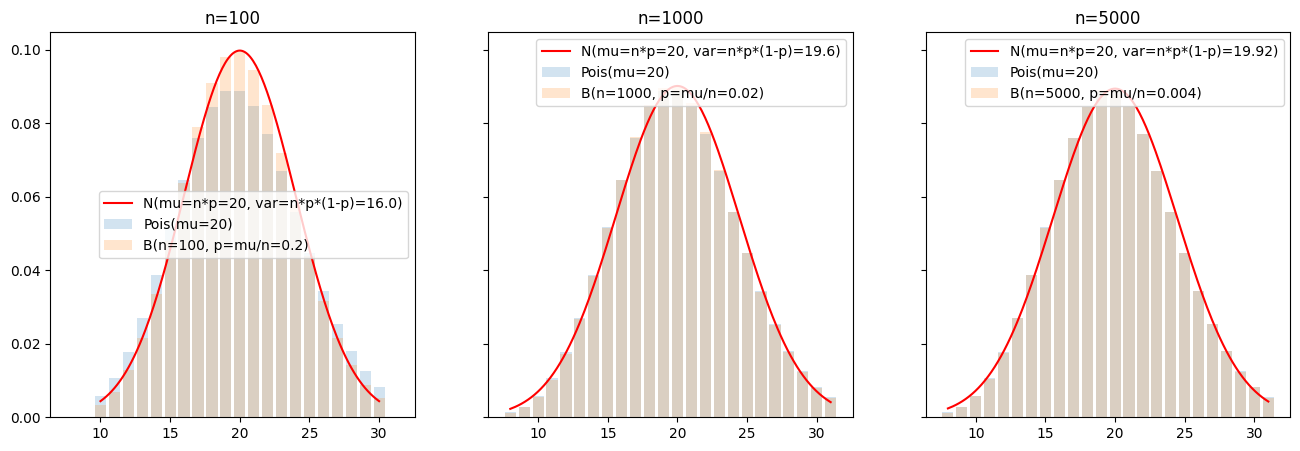
With  (fixed),
  tends towards
  when
when  (and then
  ). Thus, a binomial random variable
  with large and small can be approximated by a Poisson random variable
  .
.
Note that by the central limit theroem (CLT), for large, a binomial random variable can be approximated by a normal law  .
.
[4]:
# Parameter mu of the Poisson law (its mean)
mu = 20.

# Parameter n, p of the binomial law s.t. np = mu, with different values for n

plt.subplots(1, 3, figsize=(16,5), sharex=True, sharey=True)
for i, n in enumerate([100, 1000, 5000]):
    p = mu/n

    var = n*p*(1-p)   # variance of the binomial law
    sd = np.sqrt(var) # standard deviation of the binomial law

    x = np.arange(max(int(mu - 2.5*sd), 0), min(int(mu + 2.5*sd + 1), n+1))

    px = stats.poisson.pmf(x, mu) # probability mass function of the Poisson law
    bx = stats.binom.pmf(x, n, p) # probability mass function of the binomial law

    t = np.linspace(x.min(), x.max(), 200)
    y = stats.norm.pdf(t, loc=mu, scale=sd) # pdf of the normal law N(mu, var)

    plt.subplot(1, 3, i+1)
    plt.bar(x, px, alpha=.2, label='Pois(mu={:.4g})'.format(mu))
    plt.bar(x, bx, alpha=.2, label='B(n={}, p=mu/n={:.4g})'.format(n, p))
    plt.plot(t, y, color='red', label='N(mu=n*p={:.4g}, var=n*p*(1-p)={})'.format(mu, var))
    plt.legend()
    plt.title('n={}'.format(n))
plt.show()
Poisson point process
Consider a domain  and a parameter
  .
.
A Poisson point process consists in drawing a number  following a Poisson law
  and then drawing uniformly random points in .
Then a Poisson point process of a parameter gives, in mean, points per unitary volume, randomly (uniformly) located, is the intensity.
The function geone.randProcess.poissonPointProcess allows to generates points (in any dimension) according to a Poisson point process. See the examples below.
Homogeneous Poisson point process
The parameter is constant on .
[5]:
# Domain omega
xmin = (0, 0)
xmax = (10, 2)

# Mean number of point in omega
n_mean = 50

# Set parameters mu of the Poisson point process
vol = np.prod(np.asarray(xmax) - np.asarray(xmin)) # volume (area) of omega
mu = n_mean / vol # mean number of points per unitary volume

# Realizations of Poisson point process
nreal = 6
np.random.seed(123) # set seed for reproducibility
pts = [gn.randProcess.poissonPointProcess(mu, xmin, xmax) for i in range(nreal)]

# Plot realizations
plt.subplots(2, 3, figsize=(16,12), sharex=True, sharey=True)
for i in range(6):
    plt.subplot(2, 3, i+1)
    plt.plot(pts[i][:,0], pts[i][:,1], marker='o', ls='')
    plt.grid()
    plt.title(f'#points = {pts[i].shape[0]}')

plt.show()

print(f'Mean number of points in the domain: {n_mean}')
print(f'Volume of the domain: {vol}')
print(f'Poisson parameter mu: {mu}')
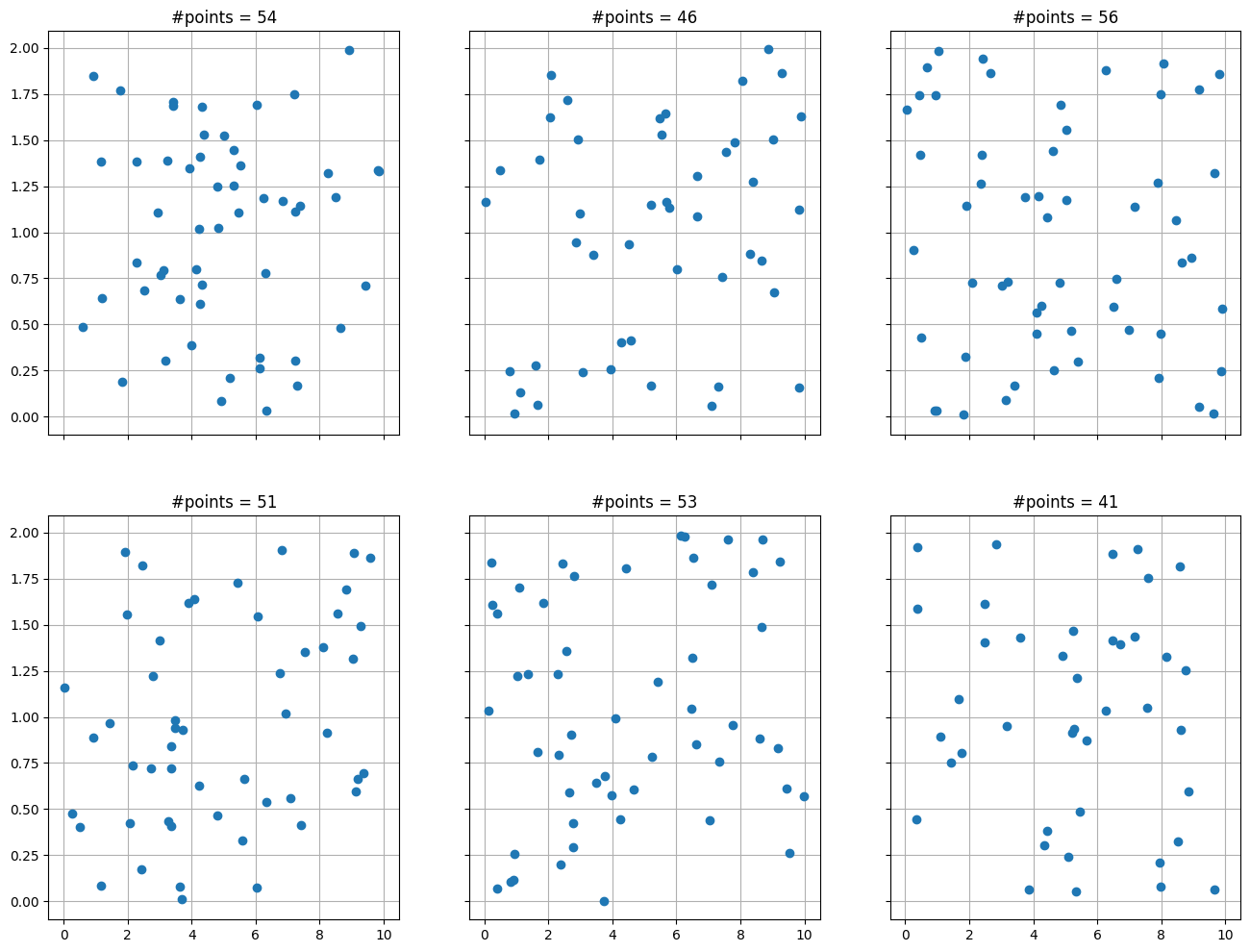
Mean number of points in the domain: 50
Volume of the domain: 20
Poisson parameter mu: 2.5
Non-homogeneous Poisson point process
The parameter is varying on .
Parameter defined as a function (on )
[6]:
# Define parameter mu as a function
def mu_f(x):
    """
    Function returning the density of point (mean number of point per unitary volume) as function of
    the location (x0, x1): mu_f((x0, x1)) = 2*x0**2.
    Parameter x:
        array of shape (2,) (one location in 2D)
        or array of shape (n, 2) (n location(s) in 2D)
    """
    return 0.2*np.atleast_2d(x)[:,0]**2
[7]:
# Domain omega
xmin = (0, 0)
xmax = (10, 2)

# Resolution: number of intervals for subdividing the domain in each direction
#   - coarse resolution can be set along x (resp. y) if mu does not depend on x (resp. y)
#   - in our example, mu (function mu_f) is constant along y axis
ninterval = (100,1)

# Realizations of Poisson point process
nreal = 6
np.random.seed(123) # set seed for reproducibility
pts = [gn.randProcess.poissonPointProcess(mu_f, xmin, xmax, ninterval=ninterval) for i in range(nreal)]

# Plot realizations
plt.subplots(2, 3, figsize=(16,8), sharex=True, sharey=True)
for i in range(6):
    plt.subplot(2, 3, i+1)
    plt.plot(pts[i][:,0], pts[i][:,1], marker='o', ls='')
    plt.xlim((xmin[0], xmax[0]))
    plt.ylim((xmin[1], xmax[1]))
    plt.grid()
    plt.title('#points = {}'.format(pts[i].shape[0]))

plt.show()

[8]:
def mu_f_2var(x, y):
    return mu_f(np.array([x,y]))

n_mean = integrate.nquad(mu_f_2var, [[xmin[0], xmax[0]], [xmin[1], xmax[1]]])[0]
print(f'Mean number of points in the domain: {n_mean}')
# Note: the integral of our function (x,y)-> 0.2*x^2 on the domain [0,10] x [0, 2] is equal to 400/3
# (the value of n_mean)
Mean number of points in the domain: 133.33333333333331
Plotting the function in the background
[9]:
# Define image (Img class from geone.img) with the desired resolution
spacing = (np.asarray(xmax) - np.asarray(xmin)) / np.asarray(ninterval)
im_mu = gn.img.Img(nx=ninterval[0], ny=ninterval[1], nz=1,
                   sx=spacing[0]  , sy=spacing[1],   sz=1.,
                   ox=xmin[0],      oy=xmin[1],      oz=0.,
                   nv=1, val=np.nan) # empty image

# Define values of mu in the image: values of the function at each cell center
yy_cell, xx_cell = im_mu.yy(), im_mu.xx()
# or:
yy_cell, xx_cell = np.meshgrid(im_mu.y(), im_mu.x(), indexing='ij') # coordinates of cell centers

xy_cell = np.array((xx_cell.reshape(-1), yy_cell.reshape(-1))).T # array of shape(n, 2) of coordinates of cell centers
mu_cell = mu_f(xy_cell) # value of mu on omega
#mu_cell = mu_f_2var(xx_cell, yy_cell) # alternative
im_mu.set_var(mu_cell)

# Plot realizations
plt.subplots(2, 3, figsize=(16,3), sharex=True, sharey=True)
for i in range(6):
    plt.subplot(2, 3, i+1)
    gn.imgplot.drawImage2D(im_mu, cmap=gn.customcolors.cmapW2B, colorbar_aspect=5)
    plt.plot(pts[i][:,0], pts[i][:,1], marker='+', ls='', color='orange')
    plt.title('#points = {}'.format(pts[i].shape[0]))

plt.show()

Parameter defined as an array (on )
An array of values for the parameter can be passed to the function geone.randProcess.poissonPointProcess.
[10]:
# Equivalent to previous realizations...
np.random.seed(123) # set seed for reproducibility
pts_B = [gn.randProcess.poissonPointProcess(im_mu.val[0,0,:,:], xmin, xmax) for i in range(nreal)]
[np.all(pts[i] == pts_B[i]) for i in range(nreal)]  # nreal times "True"
[10]:
[np.True_, np.True_, np.True_, np.True_, np.True_, np.True_]
Parameter defined as an array (or image) (on ) - another example
[11]:
# Simulation domain (omega)
nx, ny = 100, 100  # number of cells in each direction
sx, sy = 0.1, 0.02 # cell size in each direction
ox, oy = 0.0, 0.0  # origin
# same domain as before...

# Set mu as a GRF simulation (truncated to positive value) (see other jupyter notebooks)
cov_model = gn.covModel.CovModel2D(elem=[
    ('matern', {'w':10., 'r':[2., .2], 'nu':3.}), # elementary contribution
    ], name='model-2D example')
cov_model = gn.covModel.CovModel2D(elem=[
    ('gaussian', {'w':10., 'r':[2., .5]}), # elementary contribution
    ('nugget', {'w':.1})                   # elementary contribution
    ], name='model-2D example')

np.random.seed(111)
mu = gn.grf.grf2D(cov_model, (nx, ny), (sx, sy), mean=7., nreal=1, verbose=0)

# Truncate and Fill image (Img class)
im_mu = gn.img.Img(nx, ny, 1, sx, sy, 1.0, ox, oy, 0.0, nv=1, val=np.maximum(mu, 0.))
# Note: truncate values to have positive intensity


# Poisson point process realizations (with same mu image)
xmin = (ox, oy)
xmax = (ox+nx*sx, oy+ny*sy)

nreal = 6
np.random.seed(123) # set seed for reproducibility
pts = [gn.randProcess.poissonPointProcess(im_mu.val[0,0,:,:], xmin, xmax) for i in range(nreal)]

# Plot realizations
plt.subplots(2, 3, figsize=(16,3), sharex=True, sharey=True)
for i in range(6):
    plt.subplot(2, 3, i+1)
    gn.imgplot.drawImage2D(im_mu, cmap=gn.customcolors.cmapW2B, colorbar_aspect=5)
    plt.plot(pts[i][:,0], pts[i][:,1], marker='+', ls='', color='orange')
    plt.title('#points = {}'.format(pts[i].shape[0]))

plt.show()

print('Mean number of points in the domain: {}'.format(np.sum(im_mu.val[0,0,:,:])*im_mu.sx*im_mu.sy))

Mean number of points in the domain: 147.8545893760947
Chentsov’s simulation
The principle of Chentsov simulation in dimension  is the following. First define:
the “direction origin”

for a direction
 , the half sphere in dimension
  , and a real number , consider the hyper-plane
i.e. the points
 such that the projection of
  onto
onto  is equal to .
A Chentsov simulation in dimension given a parameter  consists in drawing pairs
![(v_i, p_i)\in \mathbb{S}^{d-1}_+ \times [p_{min}, p_{max}]](../_images/math/3152b7f278d642c10980ed2bcd603c68d59c3b98.png)
according to an homogeneous Poisson point process of intensity  , and then for any
  , retrieving the number
  of hyper-planes (among
  ) cut by the segment
 ![[x_0, x]](../_images/math/934687c4052d716183cb63b4d58fe01c39cd8004.png) . The field
. The field  is the resulting Chentsov simulation.
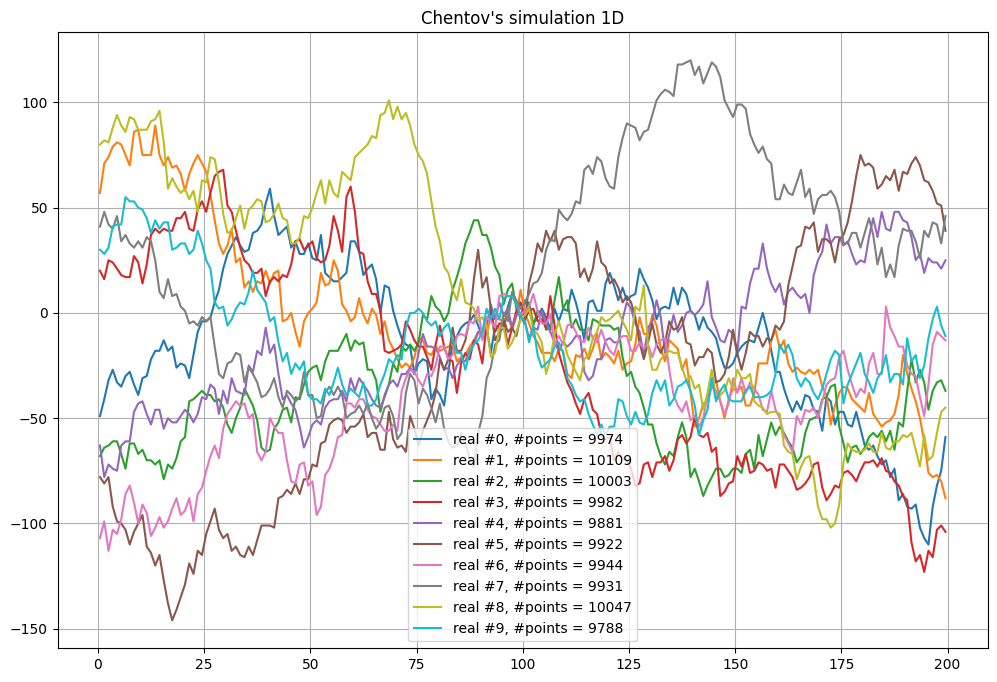
Chentsov’s simulation 1D - function geone.randProcess.chentsov1D
Note that for 1D,  is reduced to the point
  . In addition to the definition of the simulation domain, the required parameters are:
direction_origin: the point ; default: the center of the simulation domain
p_minandp_max: and
and  ; default:
  half length of the simulation domain
[12]:
# Define simulation domain
nx = 200  # number of cells
sx = 1.0  # cell size
ox = 0.0  # origin

# Mean for total number of points (for Poisson process)
n_mean = 10000

# Chentov's simulation
nreal = 10
np.random.seed(532) # set seed for reproducibility
t1 = time.time()
sim, n_eff = gn.randProcess.chentsov1D(n_mean, nx, sx, ox, nreal=nreal)
# -> sim: array of shape (nreal, nx), sim[i]: i-th real
# -> n_eff: array of shape (nreal,), number of points drawn for each real
t2 = time.time()
print(f'Elapsed time: {t2-t1:.2g} sec')

# x coordinates of the cell center in 1D grid
x = ox + (np.arange(nx)+0.5)*sx

# Figure
plt.figure(figsize=(12,8))
for i in range(10):
    plt.plot(x, sim[i], label=f'real #{i}, #points = {n_eff[i]}')

plt.legend()
plt.grid()
plt.title("Chentov's simulation 1D")
plt.show()
Elapsed time: 0.46 sec
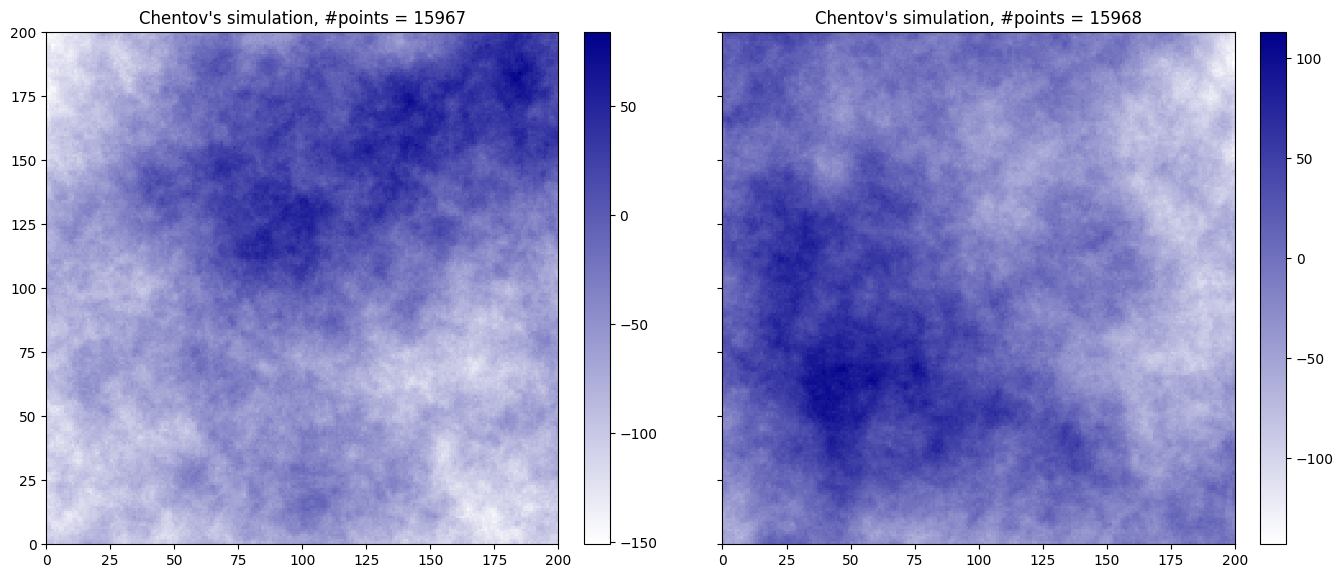
Chentsov’s simulation 2D - function geone.randProcess.chentsov2D
Note that for 2D,  is the half circle. It is parametrized via

In addition to the definition of the simulation domain, the required parameters are:
direction_origin: the point; default: the center of the simulation domainphi_minandphi_max: and
and  defining the interval of value for
  (in the parametrization, this allows to consider only a part of
  ); default:
 \phi_min=0,phi_max=np.pi(i.e. )
)p_minandp_max: and ; default: half of the diagonal of the simulation domain
[13]:
# Define simulation domain
nx, ny = 200, 200  # number of cells
sx, sy = 1.0, 1.0  # cell size
ox, oy = 0.0, 0.0  # origin

# Mean for total number of points (for Poisson process)
n_mean = 16000

# Chentov's simulation
nreal = 2
np.random.seed(532) # set seed for reproducibility
t1 = time.time()
sim, n_eff = gn.randProcess.chentsov2D(n_mean, (nx, ny), (sx, sy), (ox, oy), nreal=nreal)
# -> sim: array of shape (nreal, ny, nx), sim[i]: i-th real
# -> n_eff: array of shape (nreal,), number of points drawn for each real
t2 = time.time()
print(f'Elapsed time: {t2-t1:.2g} sec')

# Fill image (Img class)
im = gn.img.Img(nx, ny, 1, sx, sy, 1., ox, oy, 0., nv=nreal, val=sim)
del(sim)

# Figure
plt.subplots(1,2, figsize=(16,8), sharex=True, sharey=True)
cmap = gn.customcolors.custom_cmap(['white', 'darkblue'])
for i in range(2):
    plt.subplot(1,2,i+1)
    gn.imgplot.drawImage2D(im, iv=i, cmap=cmap)
    plt.title(f"Chentov's simulation, #points = {n_eff[i]}")

plt.show()
Elapsed time: 6 sec
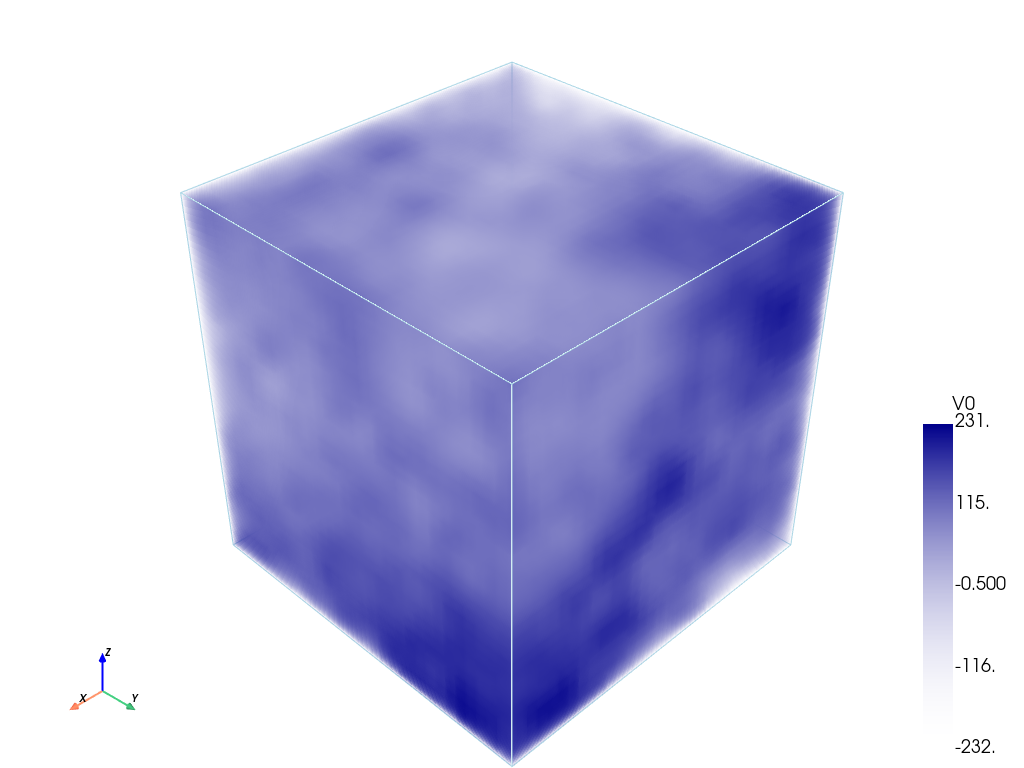
Chentsov’s simulation 3D - function geone.randProcess.chentsov3D
Note that for 3D,  is the half sphere. It is parametrized via

In addition to the definition of the simulation domain, the required parameters are:
direction_origin: the point; default: the center of the simulation domainphi_minandphi_max: and defining the interval of value for (in the parametrization); default: \phi_min=0,phi_max=2*np.pi(i.e. )
)theta_minandtheta_max: and
and  defining the interval of value for (in the parametrization); default:
 \phi_min=0,phi_max=np.pi/2(i.e. )
)p_minandp_max: and ; default: half of the diagonal of the simulation domainparam ninterval_theta: (int) number of sub-intervals in which the interval![[\vartheta_{min}, \vartheta_{max}]](../_images/math/15d09e9146a715370e8676d91a1552d61ad05577.png) is subdivided for applying the Poisson process (it allows to account for the jacobian of the parametrization of
is subdivided for applying the Poisson process (it allows to account for the jacobian of the parametrization of  , i.e. accounting for “elementary” volume (area) in ); default: 100
Note that the default value for phi_min, phi_max, theta_min, theta_max corresponds to the half sphere  .
.
[14]:
# Define simulation domain
nx, ny, nz = 31, 31, 31  # number of cells
sx, sy, sz = 1.0, 1.0, 1.0 # cell size
ox, oy, oz = 0.0, 0.0, 0.0  # origin

# Mean for total number of points (for Poisson process)
n_mean = 50000

# Chentov's simulation
nreal = 1
np.random.seed(532) # set seed for reproducibility
t1 = time.time()
sim, n_eff = gn.randProcess.chentsov3D(n_mean, (nx, ny, nz), (sx, sy, sz), (ox, oy, oz), nreal=nreal)
# -> sim: array of shape (nreal, nz, ny, nx), sim[i]: i-th real
# -> n_eff: array of shape (nreal,), number of points drawn for each real
t2 = time.time()
print(f'Elapsed time: {t2-t1:.2g} sec')

# Fill image (Img class)
im = gn.img.Img(nx, ny, nz, sx, sy, sz, ox, oy, oz, nv=nreal, val=sim)
del(sim)
Elapsed time: 8.7 sec
[15]:
# Plot
cmap = gn.customcolors.custom_cmap(['white', 'darkblue'])
gn.imgplot3d.drawImage3D_volume(im, iv=0, cmap=cmap, scalar_bar_kwargs={'vertical':True})
[16]:
%%script false --no-raise-error # skip this cell! (comment this line to run the cell)
# Interactive figure

cmap = gn.customcolors.custom_cmap(['white', 'darkblue'])
pp = pv.Plotter(notebook=False) # open a plotter and specifying 'notebook=False'
gn.imgplot3d.drawImage3D_volume(im, plotter=pp, iv=0, cmap=cmap, scalar_bar_kwargs={'vertical':True})
pp.show() # open a pop-up window (interactive plot),
          # after closing the pop-up window, the position of the camera is retrieved in output.