GEONE - GEOSCLASSIC - Two-point statistics analysis of images
Two-point statistics analysis of image
image of covariance, variogram, correlogram (correlation)
geobody (connected component) image
image of connectivity functions
Gamma and Euler number connectivity indicator (curve)
Remark: examples in 2D are proposed here.
Import what is required
[1]:
import numpy as np
import matplotlib.pyplot as plt

# import package 'geone'
import geone as gn
[2]:
# Show version of python and version of geone
import sys
print(sys.version_info)
print('geone version: ' + gn.__version__)
sys.version_info(major=3, minor=13, micro=7, releaselevel='final', serial=0)
geone version: 1.3.1
Remark
The matplotlib figures can be visualized in interactive mode:
%matplotlib notebook: enable interactive mode%matplotlib inline: disable interactive mode
Generate a continuous image and a binary image (2D)
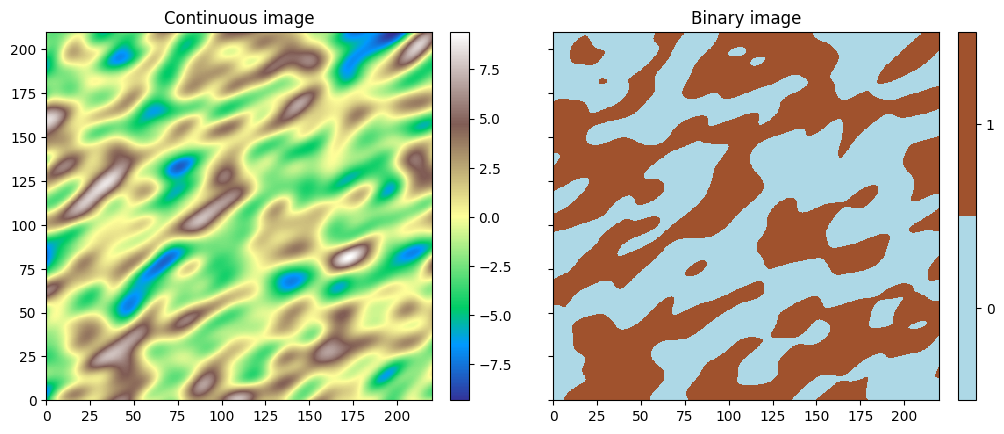
To illustrate the image analysis tools, an initial continuous image (variable  ) is generated (Gaussian Random Field, see jupyter notebook
 ex_grf_2d), and a binary image is obtained by considering the indicator variable  , i.e. setting the value
  where the continuous variable is greater than
  and the value elsewhere.
[3]:
cov_model = gn.covModel.CovModel2D(elem=[
    ('gaussian', {'w':9, 'r':[30, 15]}),   # elementary contribution (different ranges: anisotropic)
    #('nugget', {'w':0.5})                   # elementary contribution
    ], alpha=-30.0, name='ref model (anisotropic)')

# Simulation grid (domain)
nx, ny = 440, 420  # number of cells
dx, dy = 0.5, 0.5  # cell unit
ox, oy = 0.0, 0.0  # origin

# Simulation
np.random.seed(222)
v = gn.grf.grf2D(cov_model, (nx, ny), (dx, dy), (ox, oy), nreal=1)
    # 3d-array of shape 1 x ny x nx

# Define image containing the simulation
im_cont = gn.img.Img(nx, ny, 1, dx, dy, 1., ox, oy, 0., nv=1, val=v) # fill image (Img class from geone.img)

# Define the binary image
im_bin = gn.img.Img(nx, ny, 1, dx, dy, 1., ox, oy, 0., nv=1, val=(v>0))

# Display images
col_bin = ['lightblue', 'sienna']
plt.subplots(1,2,figsize=(12,8), sharey=True)

plt.subplot(1,2,1)
gn.imgplot.drawImage2D(im_cont, cmap='terrain', title='Continuous image')

plt.subplot(1,2,2)
gn.imgplot.drawImage2D(im_bin, categ=True, categVal=[0,1], categCol=col_bin, title='Binary image')

plt.show()
Basic two-point statistics
Function geone.geosclassicinterface.imgTwoPointStatisticsImage
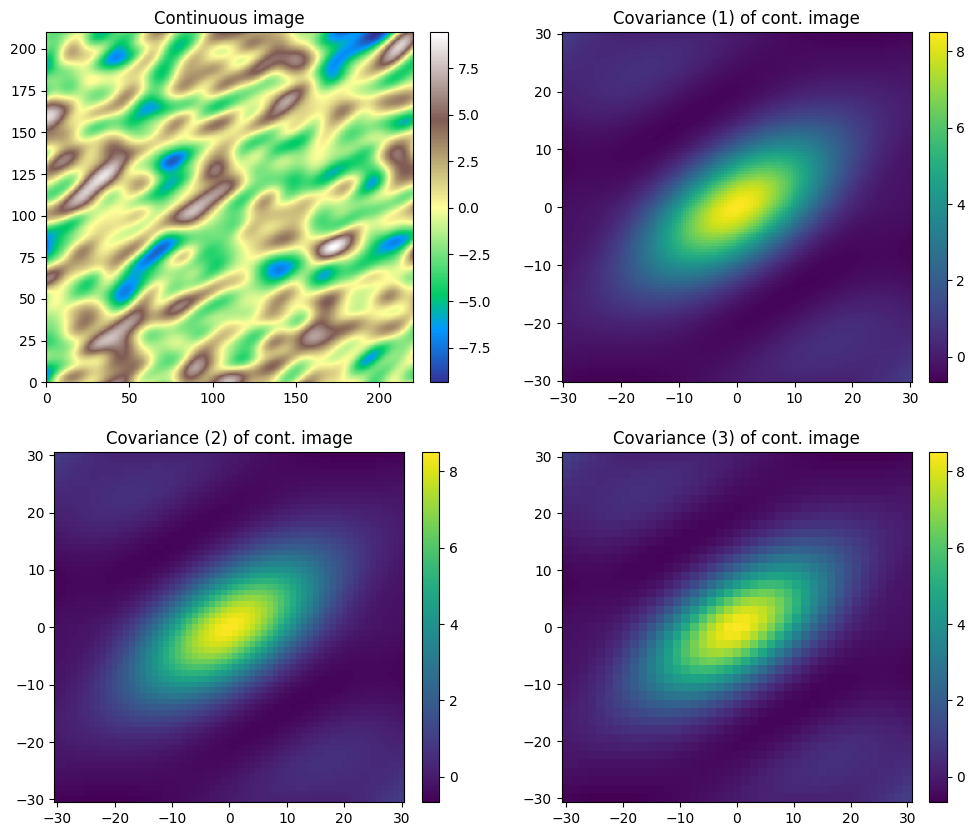
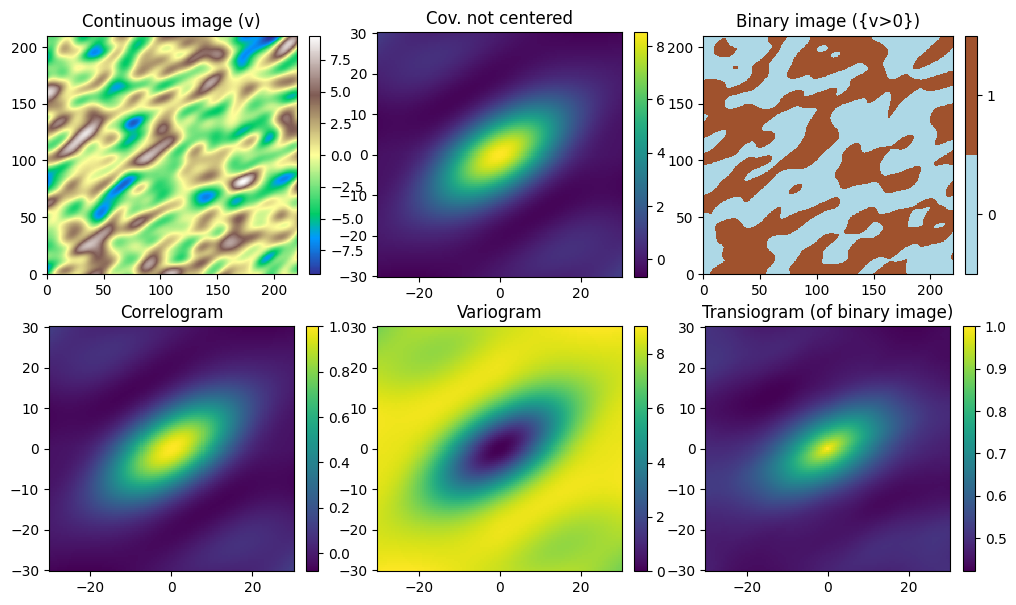
The function geone.geosclassicinterface.imgTwoPointStatisticsImage allows to compute different types of two-point statistics for a variable in an input image and produces an output image of the chosen statistics for lag  covering a grid, The following types of two-point statistics are available and passed to the function through the keyword argument
 stat_type (string):
 : Pearson correlation,
 stat_type='correlogram' : covariance,
 stat_type='covariance'(default) : covariance not centered,
 stat_type='covariance_not_centered' : transiogram,
 stat_type='transiogram' : variogram,
 stat_type='variogram'
Note that a transiogram is computed for the indicator variable  defined as (the binary image).
The minimal lag, maximal lag and the lag step in each direction are expressed in number of cells (in the input image minimal) and passed to the function with the keyword arguments hx_min, hx_max, hx_step (resp. hy_min, hy_max, hy_step and hz_min, hz_max, hz_step) for the  -axis direction (resp. for the
  and
and  -axis directions). For example,
 hx_min=-10, hx_max=10, hx_step=2 implies that lags in -axis direction of -10,
-8, -6, -4, -2, 0, 2, 4, 6, 8, 10 cells (in input image) will be considered.
By default, the minimal and maximal lags are set to  one half of the number of cells in the corresponding direction, and the lag step is set to 1.
The variable (in input image) of index var_index (keyword argument, default: 0) is considered.
This function launches a C program running in parallel (based on OpenMP). The number of threads used can be specified by the optional parameter (keyword argument) nthreads. Specifying for this parameter a number -n, negative or zero, means that the total number of cpus of the system (retrieved by os.cpu_count()) except n (but at least one) will be used. By default: nthreads=-1.
[4]:
# For the continuous image:
# compute covariance map with different resolutions
im_cont_cov_1 = gn.geosclassicinterface.imgTwoPointStatisticsImage(im_cont,
                                                                   hx_min=-60, hx_max=60, #hx_step=1,
                                                                   hy_min=-60, hy_max=60, #hy_step=1,
                                                                   #hz_min=0,   hz_max=0,  hz_step=1
                                                                   #nthreads=-1
                                                                  )
im_cont_cov_2 = gn.geosclassicinterface.imgTwoPointStatisticsImage(im_cont,
                                                                   hx_min=-60, hx_max=60, hx_step=2,
                                                                   hy_min=-60, hy_max=60, hy_step=2)
im_cont_cov_3 = gn.geosclassicinterface.imgTwoPointStatisticsImage(im_cont,
                                                                   hx_min=-60, hx_max=60, hx_step=3,
                                                                   hy_min=-60, hy_max=60, hy_step=3)

# Display images
plt.subplots(2,2,figsize=(12,10))

plt.subplot(2,2,1)
gn.imgplot.drawImage2D(im_cont, cmap='terrain', title='Continuous image')

plt.subplot(2,2,2)
gn.imgplot.drawImage2D(im_cont_cov_1, cmap='viridis', title='Covariance (1) of cont. image')

plt.subplot(2,2,3)
gn.imgplot.drawImage2D(im_cont_cov_2, cmap='viridis', title='Covariance (2) of cont. image')

plt.subplot(2,2,4)
gn.imgplot.drawImage2D(im_cont_cov_3, cmap='viridis', title='Covariance (3) of cont. image')

plt.show()
[5]:
print('covariance map 1: {} x {}, cell size = {} x {}'.format(im_cont_cov_1.nx, im_cont_cov_1.ny,
                                                              im_cont_cov_1.sx, im_cont_cov_1.sy))
print('covariance map 2: {} x {}, cell size = {} x {}'.format(im_cont_cov_2.nx, im_cont_cov_2.ny,
                                                              im_cont_cov_2.sx, im_cont_cov_2.sy))
print('covariance map 3: {} x {}, cell size = {} x {}'.format(im_cont_cov_3.nx, im_cont_cov_3.ny,
                                                              im_cont_cov_3.sx, im_cont_cov_3.sy))
covariance map 1: 121 x 121, cell size = 0.5 x 0.5
covariance map 2: 61 x 61, cell size = 1.0 x 1.0
covariance map 3: 41 x 41, cell size = 1.5 x 1.5
[6]:
# Compute other two-point statistics
im_cont_cov_nc = gn.geosclassicinterface.imgTwoPointStatisticsImage(im_cont,
                    hx_min=-60, hx_max=60, hy_min=-60, hy_max=60, stat_type='covariance_not_centered')
im_cont_cor = gn.geosclassicinterface.imgTwoPointStatisticsImage(im_cont,
                    hx_min=-60, hx_max=60, hy_min=-60, hy_max=60, stat_type='correlogram')
im_cont_vario = gn.geosclassicinterface.imgTwoPointStatisticsImage(im_cont,
                    hx_min=-60, hx_max=60, hy_min=-60, hy_max=60, stat_type='variogram')
im_bin_transio = gn.geosclassicinterface.imgTwoPointStatisticsImage(im_bin, # (or im_cont)
                    hx_min=-60, hx_max=60, hy_min=-60, hy_max=60, stat_type='transiogram')

# Display images
plt.subplots(2,3,figsize=(12,7))

plt.subplot(2,3,1)
gn.imgplot.drawImage2D(im_cont, cmap='terrain', title='Continuous image (v)')

plt.subplot(2,3,2)
gn.imgplot.drawImage2D(im_cont_cov_nc, cmap='viridis', title='Cov. not centered')

plt.subplot(2,3,3)
gn.imgplot.drawImage2D(im_bin, categ=True, categVal=[0,1], categCol=col_bin, title='Binary image ({v>0})')

plt.subplot(2,3,4)
gn.imgplot.drawImage2D(im_cont_cor, cmap='viridis', title='Correlogram')

plt.subplot(2,3,5)
gn.imgplot.drawImage2D(im_cont_vario, cmap='viridis', title='Variogram')

plt.subplot(2,3,6)
gn.imgplot.drawImage2D(im_bin_transio, cmap='viridis', title='Transiogram (of binary image)')

plt.show()
Connectivity: geobody image
Function geone.geosclassicinterface.imgGeobodyImage
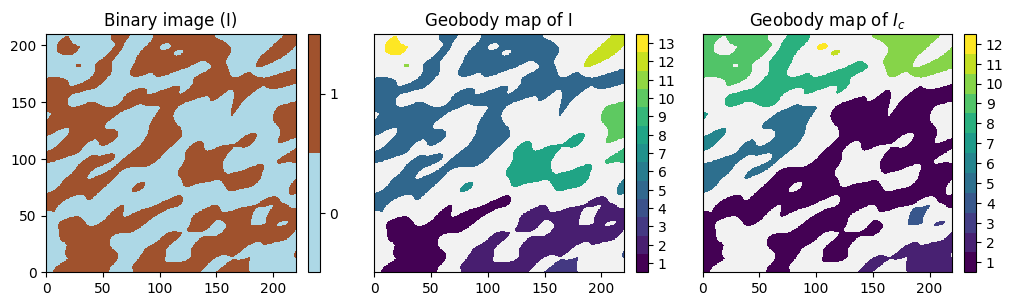
The function geone.geosclassicinterface.imgGeobodyImage computes the geobody image (map) of a binary image. The output image has the same grid geometry as the input image and one variable consisting of the geobody label in the set  from the input image (and value for cell in the set
  ).
).
The definition of adjacent cells depends on the keyword argument connect_type (string):
connect_type='connect_face'(default): two grid cells are adjacent if they have a common faceconnect_type='connect_face_edge': two grid cells are adjacent if they have a common face or a common edgeconnect_type='connect_face_edge_corner': two grid cells are adjacent if they have a common face or a common edge or a common corner
A continuous image (variable ) can be given in input, it is then transformed into a binary image (variable  ) according to the keyword argument
 bound_inf (default: ), bound_sup (default: “ ”)(floats), and
 bound_inf_excluded, bound_sup_excluded (booleans):

bound_inf
bound_supifbound_inf_excludedisTrueandbound_sup_excludedisTrue(default)-
bound_inf
bound_supifbound_inf_excludedisTrueandbound_sup_excludedisFalse -
bound_inf
bound_supifbound_inf_excludedisFalseandbound_sup_excludedisTrue -
bound_inf
bound_supifbound_inf_excludedisFalseandbound_sup_excludedisFalse
Moreover, the keyword argument complementary_set (boolean) indicates that the variable  is used instead if
 True, i.e. the complementary binary image is considered. Default: False (variable is considered).
The variable (in input image) of index var_index (keyword argument, default: 0) is considered.
This function launches a C program (running in serial).
The algorithm used is described in Hoshen and Kopelman (1976) Physical Review B, 14(8):3438.
[7]:
# Compute geobody map of the binary image
im_bin_geo = gn.geosclassicinterface.imgGeobodyImage(im_bin)
im_bin_c_geo = gn.geosclassicinterface.imgGeobodyImage(im_bin, complementary_set=True)

# Display images
plt.subplots(1,3,figsize=(12,8))

plt.subplot(1,3,1)
gn.imgplot.drawImage2D(im_bin, categ=True, categVal=[0,1], categCol=col_bin, title='Binary image (I)')

plt.subplot(1,3,2)
gn.imgplot.drawImage2D(im_bin_geo, categ=True, categVal=np.arange(1,im_bin_geo.val.max()+1),
                       yticks=[], title='Geobody map of I')
# value 0 not included in categVal so that it is not displayed

plt.subplot(1,3,3)
gn.imgplot.drawImage2D(im_bin_c_geo, categ=True, categVal=np.arange(1,im_bin_c_geo.val.max()+1),
                       yticks=[], title='Geobody map of $I_c$')

plt.show()
Connectivity analysis: ‘’connectogram’’
Function geone.geosclassicinterface.imgTwoPointStatisticsImage
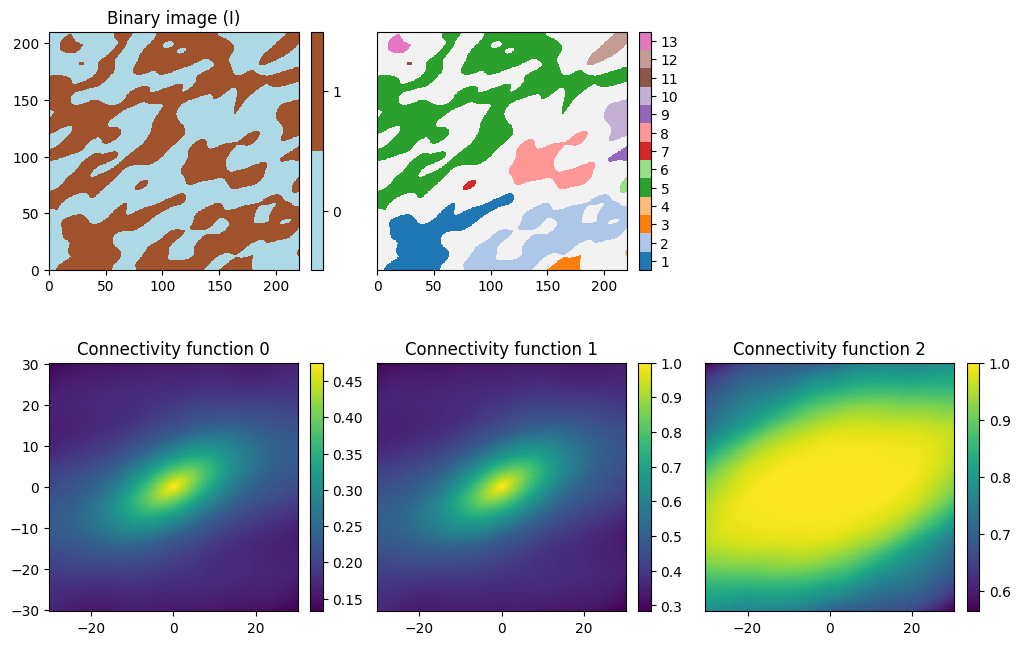
The function geone.geosclassicinterface.imgTwoPointStatisticsImage also allows to compute probability of connection between two pairs of points as function as the lag between their locations.
The input image must be the geobody image of the underlying indicator variable I considered (computed using the function geone.geosclassicinterface.imgGeobodyImage). Let  be the variable given the geobody label (equals to 0 if in no geobody), and let write
  if the cells located at and are connected, i.e. in the same geobody. Three connectivity function can be computed and specified by the keyword argument
 stat_type (string):
 :
: stat_type='connectivity_func0' :
: stat_type='connectivity_func1' :
: stat_type='connectivity_func2'
In particular, we have the following relation:

i.e “connectivity_func0 = connectivity_func2 * covariance_not_centered”.
See reference: Renard P, Allard D (2013), Connectivity metrics for subsurface flow and transport. Adv Water Resour 51:168–196,doi:10.1016/j.advwatres.2011.12.001.
The minimal lag, maximal lag and the lag step in each direction are expressed in number of cells and specified as explained above. The variable (in input image) of index var_index (keyword argument, default: 0) is considered. This function launches a C program running in parallel, the number of threads used (keyword argument nthreads, see above) can be specified.
[8]:
# Compute connectivity functions for the binary image im_bin
im_bin_geo = gn.geosclassicinterface.imgGeobodyImage(im_bin) # geobody image (already computed)

im_bin_connect0 = gn.geosclassicinterface.imgTwoPointStatisticsImage(im_bin_geo,
                    hx_min=-60, hx_max=60, hy_min=-60, hy_max=60, stat_type='connectivity_func0')
im_bin_connect1 = gn.geosclassicinterface.imgTwoPointStatisticsImage(im_bin_geo,
                    hx_min=-60, hx_max=60, hy_min=-60, hy_max=60, stat_type='connectivity_func1')
im_bin_connect2 = gn.geosclassicinterface.imgTwoPointStatisticsImage(im_bin_geo,
                    hx_min=-60, hx_max=60, hy_min=-60, hy_max=60, stat_type='connectivity_func2')

# Display images
plt.subplots(2,3,figsize=(12,8))

plt.subplot(2,3,1)
gn.imgplot.drawImage2D(im_bin, categ=True, categVal=[0,1], categCol=col_bin, title='Binary image (I)')

plt.subplot(2,3,2)
gn.imgplot.drawGeobodyMap2D(im_bin_geo)
plt.yticks([])
# gn.imgplot.drawImage2D(im_bin_geo, categ=True, categVal=np.arange(1,im_bin_geo.val.max()+1),
#                        yticks=[], title='Geobody map of I')

plt.subplot(2,3,3)
plt.axis('off')

plt.subplot(2,3,4)
gn.imgplot.drawImage2D(im_bin_connect0, cmap='viridis', title='Connectivity function 0')

plt.subplot(2,3,5)
gn.imgplot.drawImage2D(im_bin_connect1, cmap='viridis', yticks=[], title='Connectivity function 1')

plt.subplot(2,3,6)
gn.imgplot.drawImage2D(im_bin_connect2, cmap='viridis', yticks=[], title='Connectivity function 2')

plt.show()
Connectivity analysis: Gamma value and Euler number
The functions geone.geosclassicinterface.imgConnectivityGammaValue and geone.geosclassicinterface.imgConnectivityEulerNumber computes the Gamma value and the Euler number for a binary image (or for the indicator variable  of a continuous image with variable ).
Gamma value
The Gamma value is a global measure of connectivity and is defined as

where  is the number of connected components (geobodies) of the set and
  the number of cells in the
  -th geobody (geobody of label ). Hence,
  is the probability that two cells (possibly the same ones) taken randomly in the set are connected.
Euler number
The Euler number  gives the number of connected components (geobodies) + the number of ‘’holes’’ - the number of ‘’handles’’ in the set , and can be computed by the formula

where the number of connected component (geobodies) in the set {I=1} and
 is the number of vertices (element of dimension 0) in the -th geobody
 is the number of edges (element of dimension 1) in the -th geobody
 is the number of faces (element of dimension 2) in the -th geobody
 is the number of volumes (cells, element of dimension 3) in the -th geobody
where vertices, edges, faces, and volumes of any grid cell (3D parallelepiped element) are considered.
See reference: Renard P, Allard D (2013), Connectivity metrics for subsurface flow and transport. Adv Water Resour 51:168–196,doi:10.1016/j.advwatres.2011.12.001.
Function geone.geosclassicinterface.imgConnectivityGammaValue and
Function geone.geosclassicinterface.imgConnectivityEulerNumber
For the two functions geone.geosclassicinterface.imgConnectivityGammaValue and geone.geosclassicinterface.imgConnectivityEulerNumber, the geobody image can directly be passed as input image, in this case the keyword argument geobody_image_in_input (boolean) must be set to True (and the geobody image is not computed), by default geobody_image_in_input=False and the geobody image is first computed.
Note that only the Euler number relies on the defintion of adjacent cells of type connect_type='connect_face' (see above), and then if the geobody image is given in input this type of connectivity should have been used. For the Gamma value, any of the three types of connectivity connect_type='connect_face', connect_type='connect_face_edge', or connect_type='connect_face_edge_corner' can be used. The keyword argument connect_type is available for the function
geone.geosclassicinterface.imgConnectivityGammaValue (but ignored if the geobody image is given in input), whereas it is not available for the function geone.geosclassicinterface.imgConnectivityEulerNumber.
For both functions, the complementary set can be considered by setting the keyword argument complementary_set to True (default: False).
The variable (in input image) of index var_index (keyword argument, default: 0) is considered.
These functions launches C programs, the number of threads used (keyword argument nthreads, see above) can be specified only for the function geone.geosclassicinterface.imgConnectivityEulerNumber (parallel C program).
[9]:
# Compute gamma and Euler number for the binary image
gamma = gn.geosclassicinterface.imgConnectivityGammaValue(im_bin)
eul = gn.geosclassicinterface.imgConnectivityEulerNumber(im_bin)
# OR:
#gamma = gn.geosclassicinterface.imgConnectivityGammaValue(im_bin_geo, geobody_image_in_input=True)
#eul = gn.geosclassicinterface.imgConnectivityEulerNumber(im_bin_geo, geobody_image_in_input=True)

# Compute gamma and Euler number for the complementary image
gammaC = gn.geosclassicinterface.imgConnectivityGammaValue(im_bin, complementary_set=True)
eulC = gn.geosclassicinterface.imgConnectivityEulerNumber(im_bin, complementary_set=True)

print('Binary image       : Gamma = {}, Euler number = {}'.format(gamma, eul))
print('Complementary image: Gamma = {}, Euler number = {}'.format(gammaC, eulC))
Binary image       : Gamma = 0.3199255051059247, Euler number = 9
Complementary image: Gamma = 0.35651027007762665, Euler number = 8
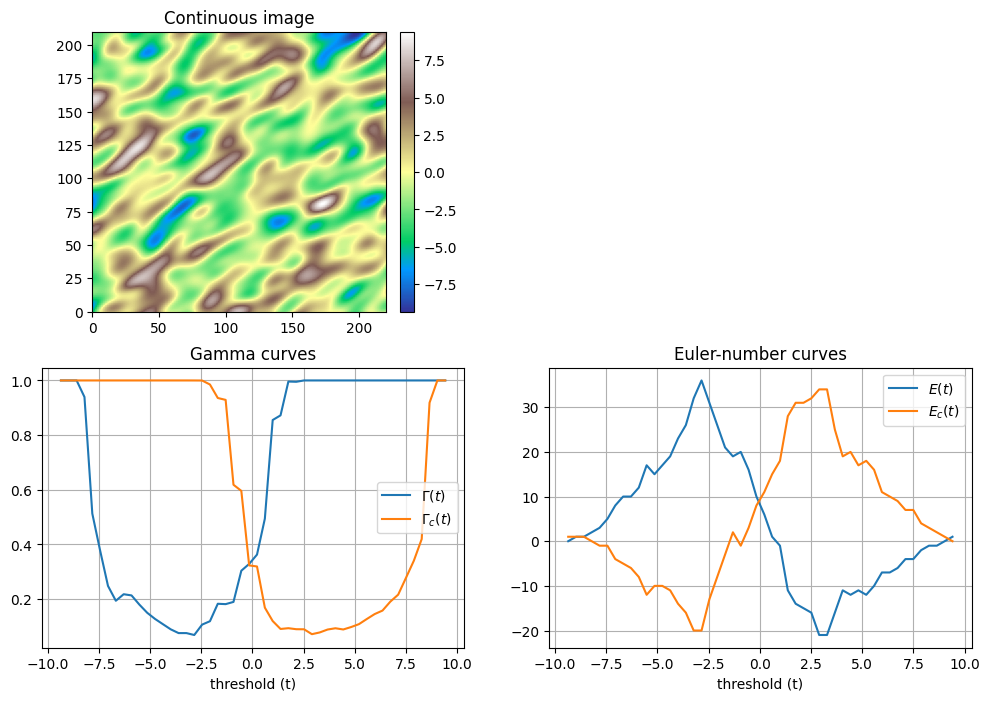
Connectivity analysis: Gamma and Euler number curves
Consider a continuous variable (continuous image) and for a threshold value  the indicator variable defined as
  .
.
Then, the Gamma value and the Euler number can be computed for the indicator variable  and for the complementary variable
  . By varying the threshold value , one obtain the curve
  ,
,  and
and  ,
,  (for and
  resp.).
The functions geone.geosclassicinterface.imgConnectivityGammaCurves and geone.geosclassicinterface.imgConnectivityEulerNumberCurves computes theses curves. The threshold values considered are determined by the keyword arguments threshold_min, threshold_max and nthreshold: nthreshold equidistant values are considered, from threshold_min to threshold_max (i.e. numpy.linspace(threshold_min, threshold_max, nthreshold)). By default, threshold_min (resp.
threshold_max) is set to the minimal (resp. maximal) value of the variable minus (resp. plus) 1.0e-10, and nthreshold to  .
.
These functions return an array of shape (nthreshold, 3) with the threshold values in colunm of index 0, and the Gamma values and resp. Euler numbers for the variable in column of index 1 and for the variable  in column of index 2.
The type of connectivity (keyword argument connect_type, see above) can be specified only for the function geone.geosclassicinterface.imgConnectivityGammaCurves.
Note that for both functions the input image must have only one variable.
For both functions, the number of threads used (keyword argument nthreads, see above) can be specified.
[10]:
# Compute gamma and Euler-number curves for the continuous image
gammat = gn.geosclassicinterface.imgConnectivityGammaCurves(im_cont)
eult = gn.geosclassicinterface.imgConnectivityEulerNumberCurves(im_cont)

# Display
plt.subplots(2,2,figsize=(12,8))

plt.subplot(2,2,2)
plt.axis('off')

plt.subplot(2,2,1)
gn.imgplot.drawImage2D(im_cont, cmap='terrain', title='Continuous image')

plt.subplot(2,2,3)
plt.plot(gammat[:,0], gammat[:,1], label='$\Gamma(t)$')
plt.plot(gammat[:,0], gammat[:,2], label='$\Gamma_c(t)$')
plt.xlabel('threshold (t)')
plt.grid()
plt.legend()
plt.title('Gamma curves')

plt.subplot(2,2,4)
plt.plot(eult[:,0], eult[:,1], label='$E(t)$')
plt.plot(eult[:,0], eult[:,2], label='$E_c(t)$')
plt.xlabel('threshold (t)')
plt.grid()
plt.legend()
plt.title('Euler-number curves')

plt.show()
<>:15: SyntaxWarning: invalid escape sequence '\G'
<>:16: SyntaxWarning: invalid escape sequence '\G'
<>:15: SyntaxWarning: invalid escape sequence '\G'
<>:16: SyntaxWarning: invalid escape sequence '\G'
/tmp/ipykernel_123504/2217170277.py:15: SyntaxWarning: invalid escape sequence '\G'
  plt.plot(gammat[:,0], gammat[:,1], label='$\Gamma(t)$')
/tmp/ipykernel_123504/2217170277.py:16: SyntaxWarning: invalid escape sequence '\G'
  plt.plot(gammat[:,0], gammat[:,2], label='$\Gamma_c(t)$')
Other tools: distance to binary media
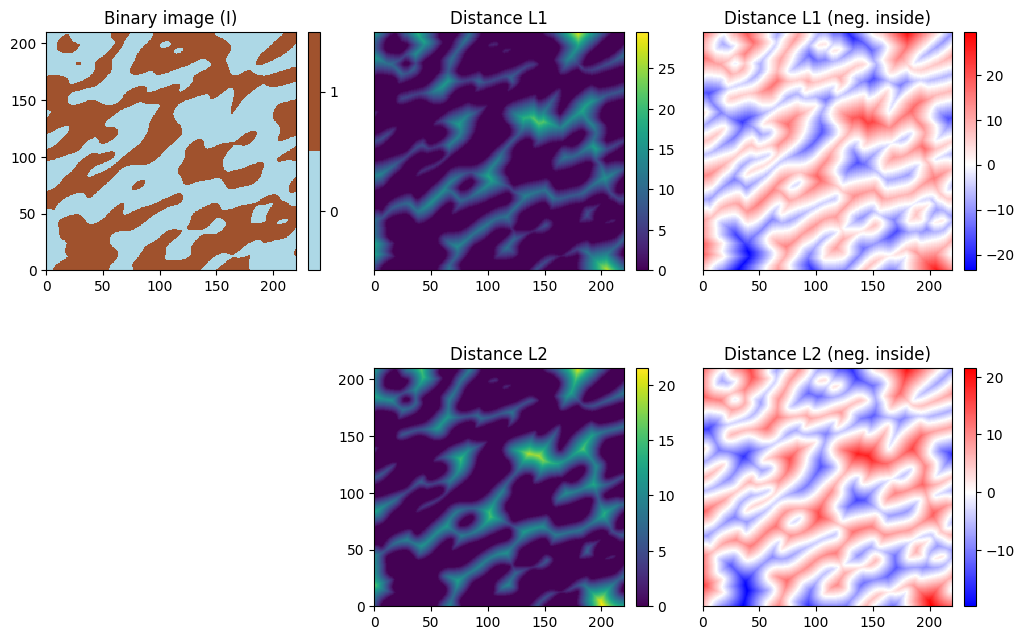
The function geone.geosclassicinterface.imgDistanceImagecomputes the distance to the set  , where is the variable of the input image, from every grid cell.
Distances  and
and  can be computed, this is specified by the keyword argument
 distance_type (string) which should be L1 or L2 (default). In addition, setting the keyword argument distance_negative to True, the distances (with a negative sign) from the interior cell of the set  to its border are computed. By default,
 distance_negative=False (distance is zero for any cell in ).
This function launches a C program running in parallel, the number of threads used (keyword argument nthreads, see above) can be specified.
[11]:
# Compute distance L1 for the binary image
im_bin_dist_L1   = gn.geosclassicinterface.imgDistanceImage(im_bin, distance_type='L1', distance_negative=False)
im_bin_dist_L1_n = gn.geosclassicinterface.imgDistanceImage(im_bin, distance_type='L1', distance_negative=True)

# Compute distance L2 for the binary image
im_bin_dist_L2   = gn.geosclassicinterface.imgDistanceImage(im_bin, distance_type='L2', distance_negative=False)
im_bin_dist_L2_n = gn.geosclassicinterface.imgDistanceImage(im_bin, distance_type='L2', distance_negative=True)

# Display images
# Custom color map from blue (min) to white (value=0) to red (max)
# ... for im_bin_dist_L1_n
cmap1 = gn.customcolors.custom_cmap(
            ['blue', 'white', 'red'],
            vseq=[im_bin_dist_L1_n.val.min(), 0, im_bin_dist_L1_n.val.max()])
# ... for im_bin_dist_L2_n
cmap2 = gn.customcolors.custom_cmap(
            ['blue', 'white', 'red'],
            vseq=[im_bin_dist_L2_n.val.min(), 0, im_bin_dist_L2_n.val.max()])

plt.subplots(2,3,figsize=(12,8))

plt.subplot(2,3,1)
gn.imgplot.drawImage2D(im_bin, categ=True, categVal=[0,1], categCol=col_bin, title='Binary image (I)')

plt.subplot(2,3,2)
gn.imgplot.drawImage2D(im_bin_dist_L1, yticks=[], title='Distance L1')

plt.subplot(2,3,3)
gn.imgplot.drawImage2D(im_bin_dist_L1_n, cmap=cmap1, yticks=[], title='Distance L1 (neg. inside)')

plt.subplot(2,3,4)
plt.axis('off')

plt.subplot(2,3,5)
gn.imgplot.drawImage2D(im_bin_dist_L2, title='Distance L2')

plt.subplot(2,3,6)
gn.imgplot.drawImage2D(im_bin_dist_L2_n, cmap=cmap2, yticks=[], title='Distance L2 (neg. inside)')

plt.show()