GEONE - Variogram analysis and kriging for data in 2D (general)
Interpolate a data set in 2D, using simple or ordinary kriging. Starting from a data set in 2D, the following is done:
basic exploratory analysis: variogram cloud / variogram rose / experimental variogram
fitting a covariance / variogram model, and cross-validation (LOO error)
interpolation by ordinary kriging (OK), simple kriging (SK)
sequential gaussian simulation (SGS) based on ordinary or simple kriging
Import what is required
[1]:
import numpy as np
import matplotlib.pyplot as plt
import time

# import package 'geone'
import geone as gn
[2]:
# Show version of python and version of geone
import sys
print(sys.version_info)
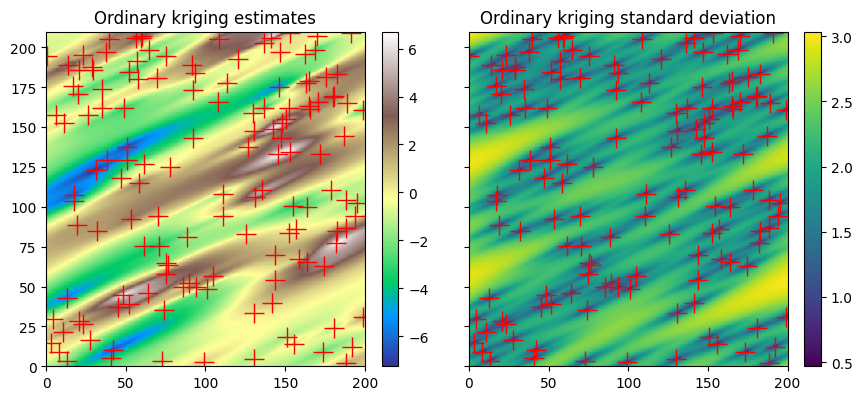
print('geone version: ' + gn.__version__)
sys.version_info(major=3, minor=13, micro=7, releaselevel='final', serial=0)
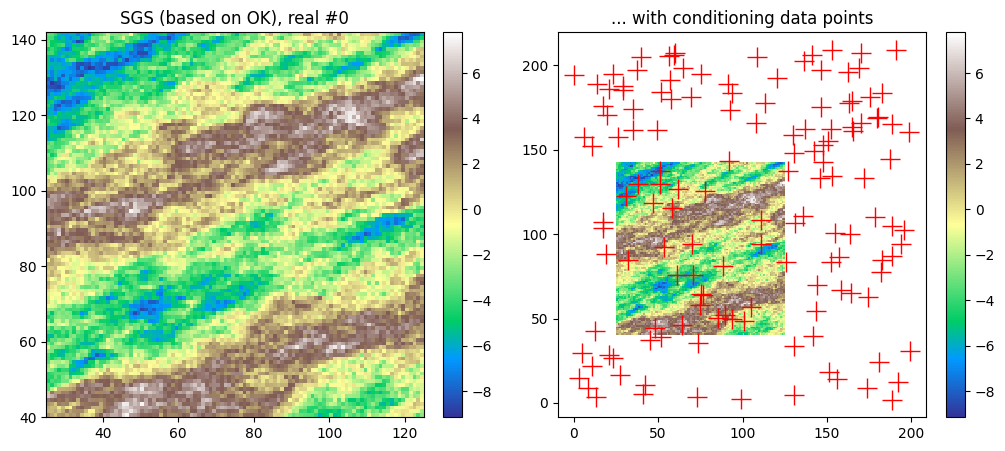
geone version: 1.3.1
Preparation - build a data set in 2D
A data set in 2D is extracted from a Gaussian random field generated based on a known covariance model, called the reference model which will be considered as unknown further.
Note: see the notebook ``ex_general_multiGaussian.ipynb`` for available covariance models and examples.
[3]:
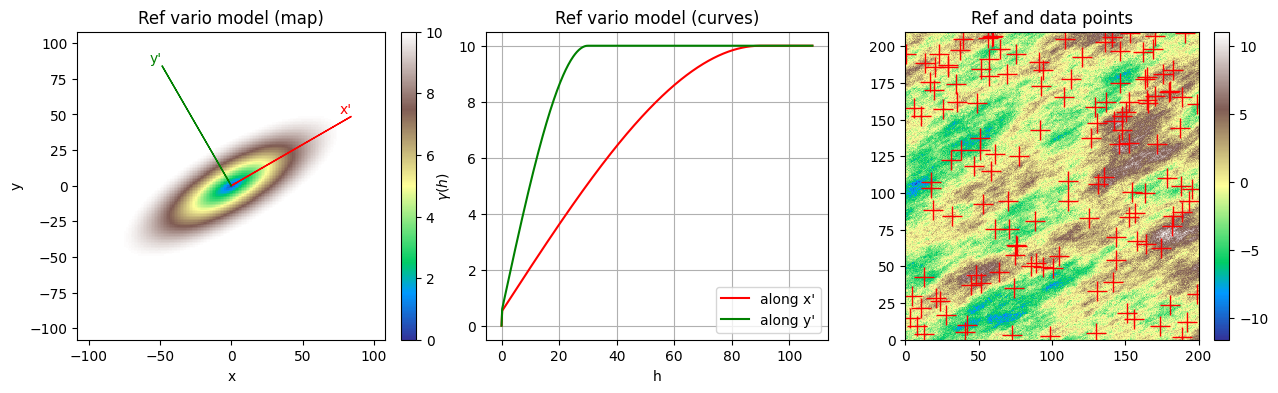
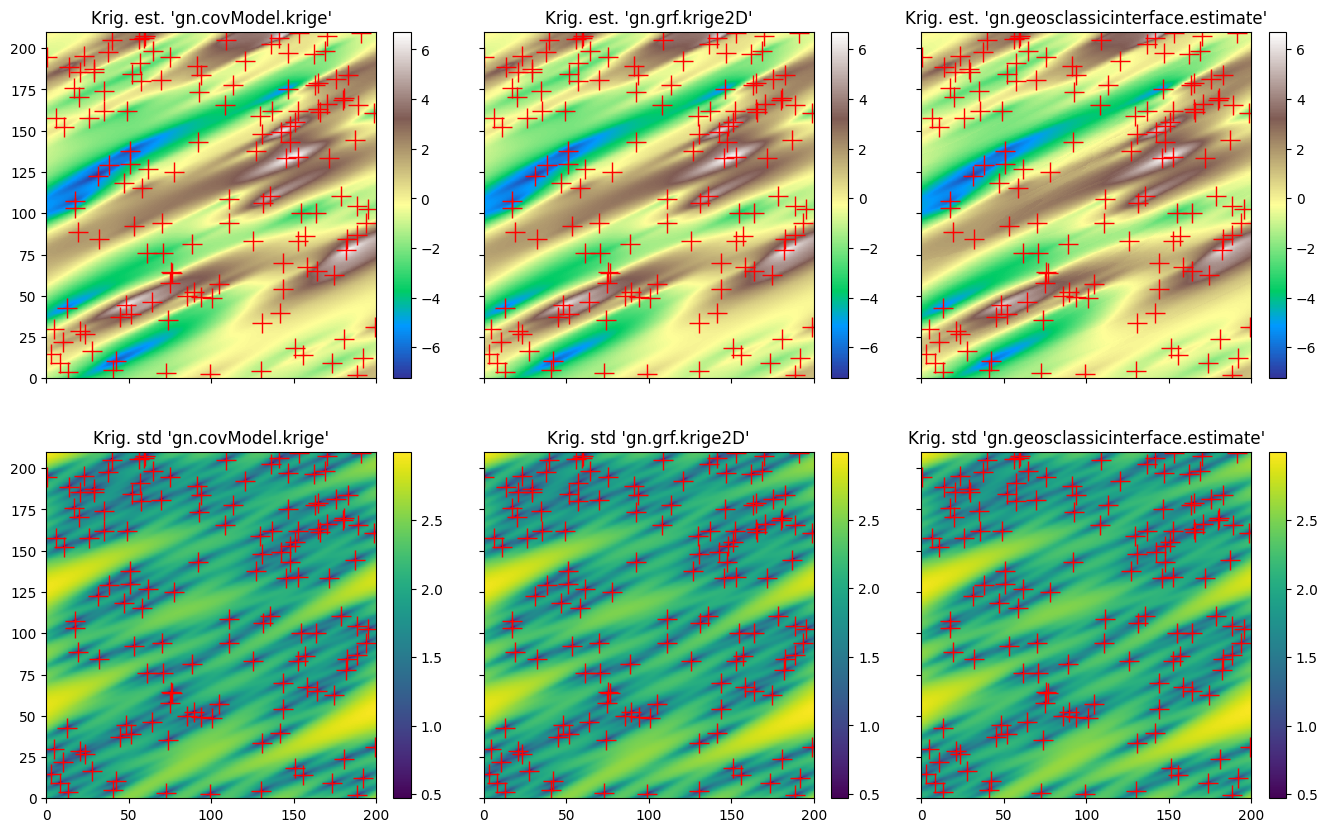
cov_model_ref = gn.covModel.CovModel2D(elem=[
    ('spherical', {'w':9.5, 'r':[90, 30]}),   # elementary contribution (different ranges: anisotropic)
    ('nugget', {'w':0.5})                     # elementary contribution
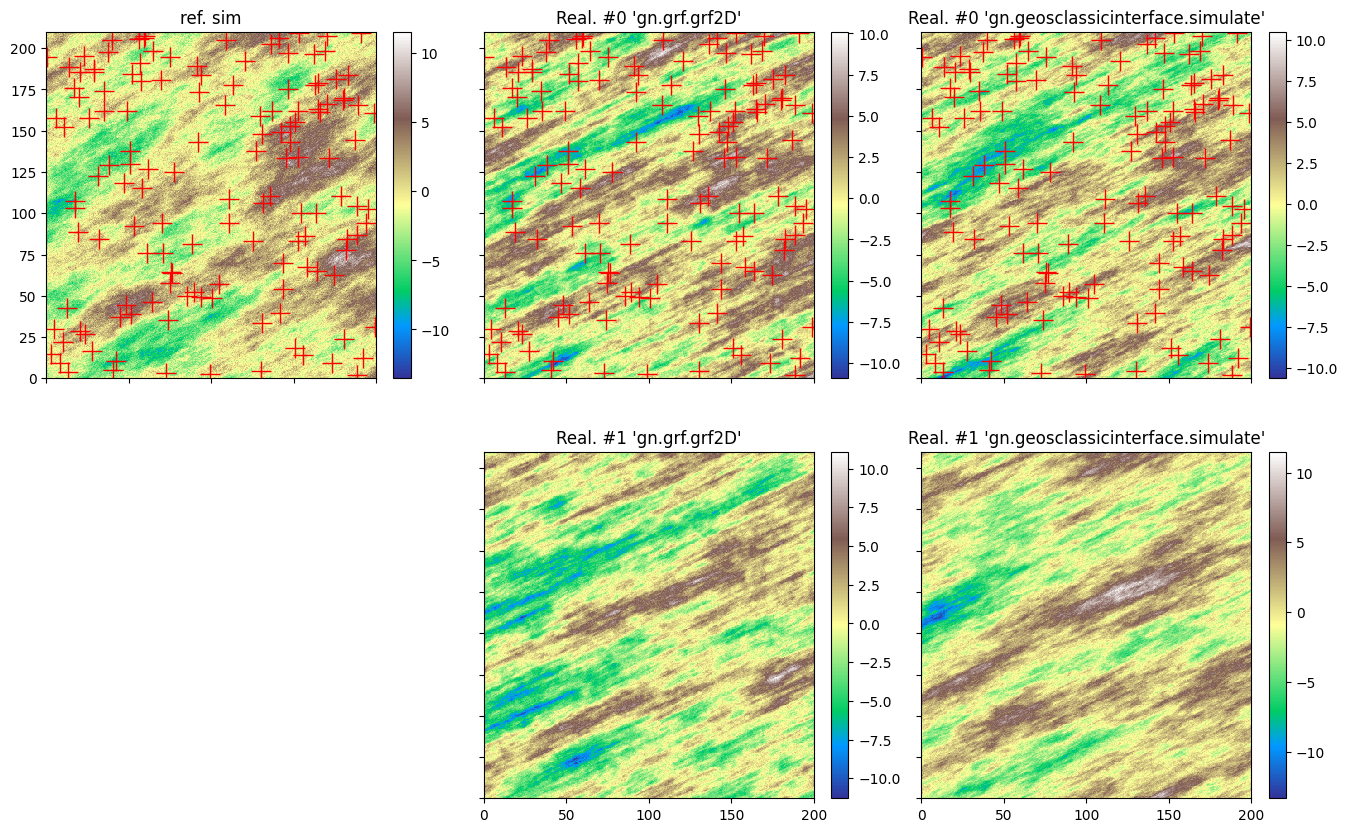
    ], alpha=-30.0, name='ref model (anisotropic)')
[4]:
cov_model_ref
[4]:
*** CovModel2D object ***
name = 'ref model (anisotropic)'
number of elementary contribution(s): 2
elementary contribution 0
    type: spherical
    parameters:
        w = 9.5
        r = [90, 30]
elementary contribution 1
    type: nugget
    parameters:
        w = 0.5
angle: alpha = -30.0 deg.
    i.e.: the system Ox'y', supporting the axes of the model (ranges),
    is obtained from the system Oxy by applying a rotation of angle -alpha.
*****
Generate a gaussian random field in 2D (see function geone.grf.grf2D), and extract data points:
n: number of data pointsx: location of data points (2-dimensional array of shape(n, 2), each row is a point)v: values at data points (1-dimensional array of lengthn)
[5]:
# Simulation grid (domain)
nx, ny = 400, 420  # number of cells
sx, sy = 0.5, 0.5  # cell unit
ox, oy = 0.0, 0.0  # origin

# Reference simulation
np.random.seed(444)
ref = gn.grf.grf2D(cov_model_ref, (nx, ny), (sx, sy), (ox, oy), nreal=1)
    # 3d-array of shape 1 x ny x nx

im_ref = gn.img.Img(nx, ny, 1, sx, sy, 1., ox, oy, 0., nv=1, val=ref) # fill image (Img class from geone.img)

# Extract n points from the reference simulation
n = 140 # number of data points
# --- Choose 1. or 2. below ---
# # 1. Sampling the image
# ps = gn.img.sampleFromImage(im_ref, n, seed=234)
# # Data points and data value
# x = np.array((ps.x(), ps.y())).T
# v = ps.val[3]
# # Optionally: move points in the grid cells randomly, and add noise to values
# x[:, 0] = x[:, 0] + (np.random.random(n)-0.5)* im_ref.sx
# x[:, 1] = x[:, 1] + (np.random.random(n)-0.5)* im_ref.sy
# v = v + (np.random.random(n)-0.5)* 1.e-1

# 2. Using the function interpolating the image values
f = gn.img.Img_interp_func(im_ref, iz=0)
np.random.seed(658)
x1 = im_ref.xmin() + np.random.random(n) * (im_ref.xmax()-im_ref.xmin())
x2 = im_ref.ymin() + np.random.random(n) * (im_ref.ymax()-im_ref.ymin())
x = np.array((x1, x2)).T
v = f(x)
# ----- #
[6]:
# Plot reference variogram model, reference simulation and data points
plt.subplots(1,3,figsize=(15,4))
plt.subplot(1,3,1)
cov_model_ref.plot_model(vario=True, plot_map=True, plot_curves=False)
plt.title('Ref vario model (map)')
plt.subplot(1,3,2)
cov_model_ref.plot_model(vario=True, plot_map=False, plot_curves=True)
plt.title('Ref vario model (curves)')
plt.subplot(1,3,3)
gn.imgplot.drawImage2D(im_ref, cmap='terrain')
plt.plot(x[:,0], x[:,1], 'r+', markersize=15)
plt.title('Ref and data points')
plt.show()
Start from a data set in 2D
n: number of data pointsx: location of data points (2-dimensional array of shape(n, 2), each row is a point)v: values at data points (1-dimensional array of lengthn)
Visualise the data set and the histogram of values.
[7]:
plt.subplots(1,2,figsize=(15,5))
plt.subplot(1,2,1)
vmin, vmax = np.min(v), np.max(v) # min and max of data values
smin, smax = 100, 1000            # min and max size of points on plot
plot = plt.scatter(x[:,0], x[:,1], c=v, s=smin+(v-vmin)/(vmax-vmin)*(smax-smin), alpha=0.5, cmap='terrain')
gn.customcolors.add_colorbar(plot)
plt.axis('equal')
plt.title('data')

plt.subplot(1,2,2)
plt.hist(v, color='lightblue', edgecolor='black')
plt.title('Histogram of data values, mean={:.2g}, var={:2g}'.format(np.mean(v), np.var(v)))
plt.show()

Variogram rose
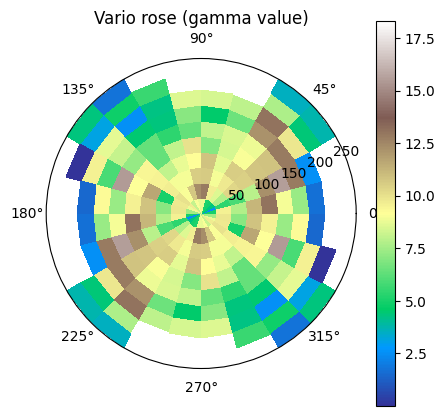
The function geone.covModel.variogramExp2D_rose shows an experimental variogram for a data set in 2D in the form of a rose plot, i.e. the lags vectors between the pairs of data points are divided in classes according to length (radius) and angle from the x-axis counter-clockwise (warning: opposite sense to the sense given by angle in definition of a covariance model in 2D).
The keyword argument r_max allows to specify a maximal length of 2D-lag vector between a pair of data points for being integrated in the variogram rose plot. The number of classes for radius (length) can be specified by the keyword argument r_ncla, and the number of classes for angle for half of the whole disk (rose plot is symmetric with respect to the origin) can be specified by the keyword argument phi_ncla.
This function can be useful to check a possible anisotropy.
[8]:
gn.covModel.variogramExp2D_rose(x, v, figsize=(5,5))
plt.show()
/home/julien/miniconda3/envs/py313/lib/python3.13/site-packages/numpy/_core/fromnumeric.py:3860: RuntimeWarning: Mean of empty slice.
  return _methods._mean(a, axis=axis, dtype=dtype,
/home/julien/miniconda3/envs/py313/lib/python3.13/site-packages/numpy/_core/_methods.py:144: RuntimeWarning: invalid value encountered in scalar divide
  ret = ret.dtype.type(ret / rcount)
For plotting a variogram rose in a multiple axes figure, proceed as follows.
[9]:
fig = plt.figure(figsize=(15,5))

fig.add_subplot(1,2,1, projection='polar')
gn.covModel.variogramExp2D_rose(x, v, r_max=100, set_polar_subplot=False)

ax = fig.add_subplot(1,2,2, projection='polar')
gn.covModel.variogramExp2D_rose(x, v, r_max=50, phi_ncla=16, set_polar_subplot=False)

plt.show()

One can observe a larger range for angles roughly between  and
and  degrees (consistent with the reference covariance model used (but ignored here) where alpha is set to -30. Hence an anisotropic covariance / variogram model should be used.
Note: if no anisotropy is detected, one can continue with omni-directional analysis (see jupyter notebook ex_vario_analysis_data2D_1_omnidirectional).
Model fitting
The function geone.covModel.covModel2D_fit is used to fit a covariance model in 2D (class geone.covModel.CovModel2D).
This function takes as first argument the location of the data points, as second argument the values at the data points, and at third argument a covariance model in 2D with given type of elementary contributions and with parameters to fit set to nan. It returns the optimal covariance model and the vector of optimal parameters.
This function is based on the function curve_fit from scipy.optimize module. It fits the curve of the variogram model to the points  , where
  is the lag between a pair of data points and
  is the half of the square of the difference of the values at these points. Hence, the fitting does not depend on the experimental variogram (see further), i.e. on the choice of direction or classes for the lags.
The function geone.covModel.covModel2D_fit also takes the keyword argument hmax, which specifies the maximal distance between two data points to be integrated in the fitting. Note that a plot of the optimal model returned is made by default (keyword argument make_plot=True).
Bounds for parameters to fit
Bounds for parameters to fit can be specified to avoid meaningless optimal parameters returned (e.g. negative weight or range). Such bounds are given to the function geone.covModel.covModel2D_fit (and then to the function curve_fit from scipy.optimize) via the keyword arguments bounds=(<array of lower bounds>, <array of upper bounds>), where the arrays of lower / upper bounds have the same length as the vector of parameters to fit, with the  th entry corresponding to
the
th entry corresponding to
the  -th parameter to fit (set to
 nan) in the covariance model passed as third argument. Note also that the keyword argument p0 allows to specify a vector of initial parameters (see doc of function curve_fit).
[10]:
cov_model_to_optimize = gn.covModel.CovModel2D(
    elem=[('gaussian',    {'w':np.nan, 'r':[np.nan, np.nan]}), # elementary contribution
          ('spherical',   {'w':np.nan, 'r':[np.nan, np.nan]}), # elementary contribution
          ('exponential', {'w':np.nan, 'r':[np.nan, np.nan]}), # elementary contribution
          ('nugget',      {'w':np.nan})                        # elementary contribution
         ], alpha=np.nan, name='')

cov_model_opt, popt = gn.covModel.covModel2D_fit(x, v, cov_model_to_optimize,
               bounds=([ 0,   0,   0,  0,   0,   0,  0,   0,   0,   .1,   -90],  # min value for param. to fit
                       [20, 200, 200, 20, 200, 200, 20, 200, 200,    2,    90]), # max value for param. to fit
                      # gaus. contr., sph. contr. , exp. contr. , nug., alpha
               make_plot=True, figsize=(15,8)) # figure size for plot

Check with the experimental variograms in the main directions (derived from optimal angle retrieved)
The function geone.covModel.variogramExp2D computes two directional exprimental variograms for a data set in 2D: one along each main axis ( and
and  ). The new system
  is defined from the angle alpha (keyword argument
 alpha) in the same way as for covariance model in 2D.
The keyword arguments tol_dist and tol_angle allow to control which pair of data points are taken into account in the two experimental variograms: a pair of points  is in the directional variogram cloud along axis (resp. ) iff, given the lag vector
  :
:
the distance from the end of vector
issued from origin to that axis is less than or equal to tol_distandthe angle between
and that axis is less than or equal to tol_angle
The maximal distance between two data points to be integrated can be specified by the keyword argument hmax (vector of two floats one for each axis), and the classes can be customized by using the keyword arguments ncla, cla_center, cla_length (each one is a vector of length 2, specification for each axis), in a similar way as explained for the function geone.covModel.variogramExp1D (see jupyter notebook ex_vario_analysis_data1D).
The function geone.covModel.variogramExp2D returns two experimental variograms “unidimensional” (see function geone.covModel.variogramExp1D and jupyter notebook ex_vario_analysis_data1D).
Note: the function geone.covModel.variogramCloud2D allows to compute variogram clouds along the main axes in a similar way.
[11]:
alpha_opt = popt[-1] # last component of popt
(hexp1, gexp1, cexp1), (hexp2, gexp2, cexp2) = gn.covModel.variogramExp2D(x, v, alpha=alpha_opt, ncla=(20,20),
                                                                          make_plot=True, figsize=(15,10))

[12]:
plt.subplots(1,2,figsize=(15,5))
plt.subplot(1,2,1)
gn.covModel.plot_variogramExp1D(hexp1, gexp1, cexp1, c='red', label='vario exp')
cov_model_opt.plot_model_one_curve(vario=True, main_axis=1, hmax=200, c='red', label='vario opt')
plt.legend()
plt.title("along x'")

plt.subplot(1,2,2)
gn.covModel.plot_variogramExp1D(hexp2, gexp2, cexp2, c='green', label='vario exp')
cov_model_opt.plot_model_one_curve(vario=True, main_axis=2, hmax=200, c='green', label='vario opt')
plt.legend()
plt.title("along y'")

plt.show()

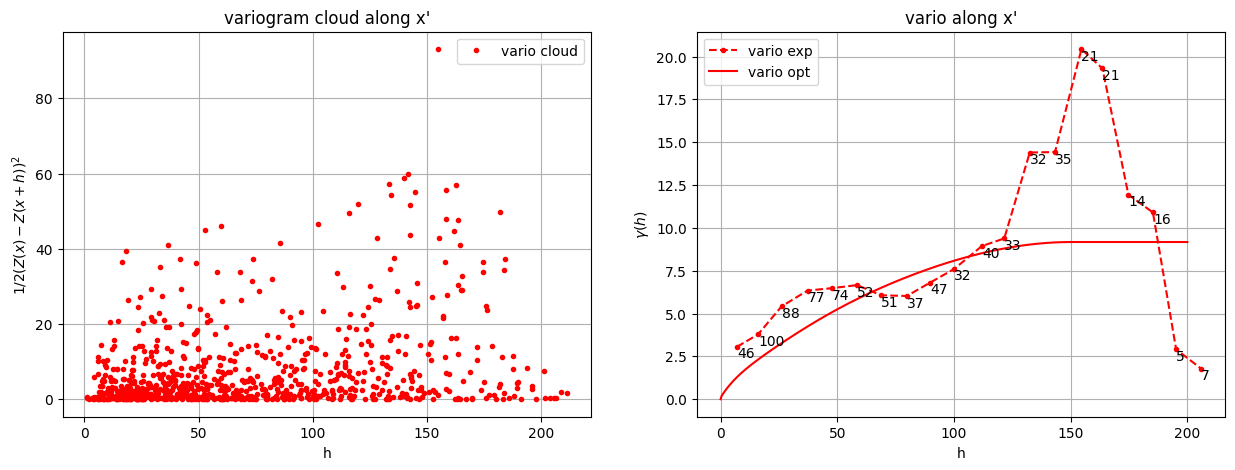
Computation of variogram cloud and experimental variogram along one main axis
Passing the keyword argument hmax=(None, 0) to the function gn.covModel.variogramCloud2D (resp. gn.covModel.variogramExp2D) allows to compute the variogram cloud (resp. the experimental variogram) along the fisrt main axis. Passing hmax=(0, None) will imply computation for the second main axis. Note that the component None in hmax can be replaced by a specific value.
[13]:
alpha_opt = popt[-1] # last component of popt
(h1, g1, n1), _ = gn.covModel.variogramCloud2D(x, v, alpha=alpha_opt, hmax=(None, 0), make_plot=False)
(hexp1, gexp1, cexp1), _ = gn.covModel.variogramExp2D(x, v, alpha=alpha_opt, hmax=(None, 0), ncla=(20,20), make_plot=False)
# (hexp1, gexp1, cexp1), _ = gn.covModel.variogramExp2D(None, None, variogramCloud=((h1, g1, n1), ([], [], 0)), hmax=(None, 0), ncla=(20,20), make_plot=False) # Equivalent (variogram cloud is directly given)

plt.subplots(1,2,figsize=(15,5))
plt.subplot(1,2,1)
gn.covModel.plot_variogramCloud1D(h1, g1, c='red')
plt.legend()
plt.title("variogram cloud along x'")

plt.subplot(1,2,2)
gn.covModel.plot_variogramExp1D(hexp1, gexp1, cexp1, c='red', label='vario exp')
cov_model_opt.plot_model_one_curve(vario=True, main_axis=1, hmax=200, c='red', label='vario opt')
plt.legend()
plt.title("vario along x'")

plt.show()
[14]:
alpha_opt = popt[-1] # last component of popt
(hexp1, gexp1, cexp1), _ = gn.covModel.variogramExp2D(x, v, alpha=alpha_opt, hmax=(None, 0), ncla=(20,20), make_plot=False)
_, (hexp2, gexp2, cexp2) = gn.covModel.variogramExp2D(x, v, alpha=alpha_opt, hmax=(0, None), ncla=(20,20), make_plot=False)

plt.subplots(1,2,figsize=(15,5))
plt.subplot(1,2,1)
gn.covModel.plot_variogramExp1D(hexp1, gexp1, cexp1, c='red', label='vario exp')
cov_model_opt.plot_model_one_curve(vario=True, main_axis=1, hmax=200, c='red', label='vario opt')
plt.legend()
plt.title("along x'")

plt.subplot(1,2,2)
gn.covModel.plot_variogramExp1D(hexp2, gexp2, cexp2, c='green', label='vario exp')
cov_model_opt.plot_model_one_curve(vario=True, main_axis=2, hmax=200, c='green', label='vario opt')
plt.legend()
plt.title("along y'")

plt.show()

Cross-validation of covariance model by leave-one-out error
The function geone.covModel.cross_valid_loo makes a cross-validation test by leave-one-out (LOO) error. Here, a data set in 2D and a covariance model in 2D are given.
See jupyter notebook ex_vario_analysis_data1D for more details about this function.
[15]:
# Interpolation by ordinary kriging
cv_est1, cv_std1, crps1, crps_def1, pvalue1, success1 = gn.covModel.cross_valid_loo(
                                        x, v, cov_model_opt,
                                        interpolator=gn.covModel.krige,
                                        interpolator_kwargs={'method':'ordinary_kriging'},
                                        print_result=True, make_plot=True, figsize=(15,10), nbins=20)
plt.show()
----- CRPS (negative; the larger, the better) -----
   mean = -1.143
   def. = -0.6945
----- 1) "Normal law test for mean of normalized error" -----
   p-value = 0.6332
   success = True (wrt significance level 0.05)
      (-> model has no reason to be rejected)
----- 2) "Chi-square test for sum of squares of normalized error" -----
   p-value = 0.5748
   success = True (wrt significance level 0.05)
      (-> model has no reason to be rejected)
----- Statistics of normalized error -----
   mean     = 0.04033 (should be close to 0)
   std      = 0.9855 (should be close to 1)
   skewness = -0.1094 (should be close to 0)
   excess kurtosis = -0.1918 (should be close to 0)
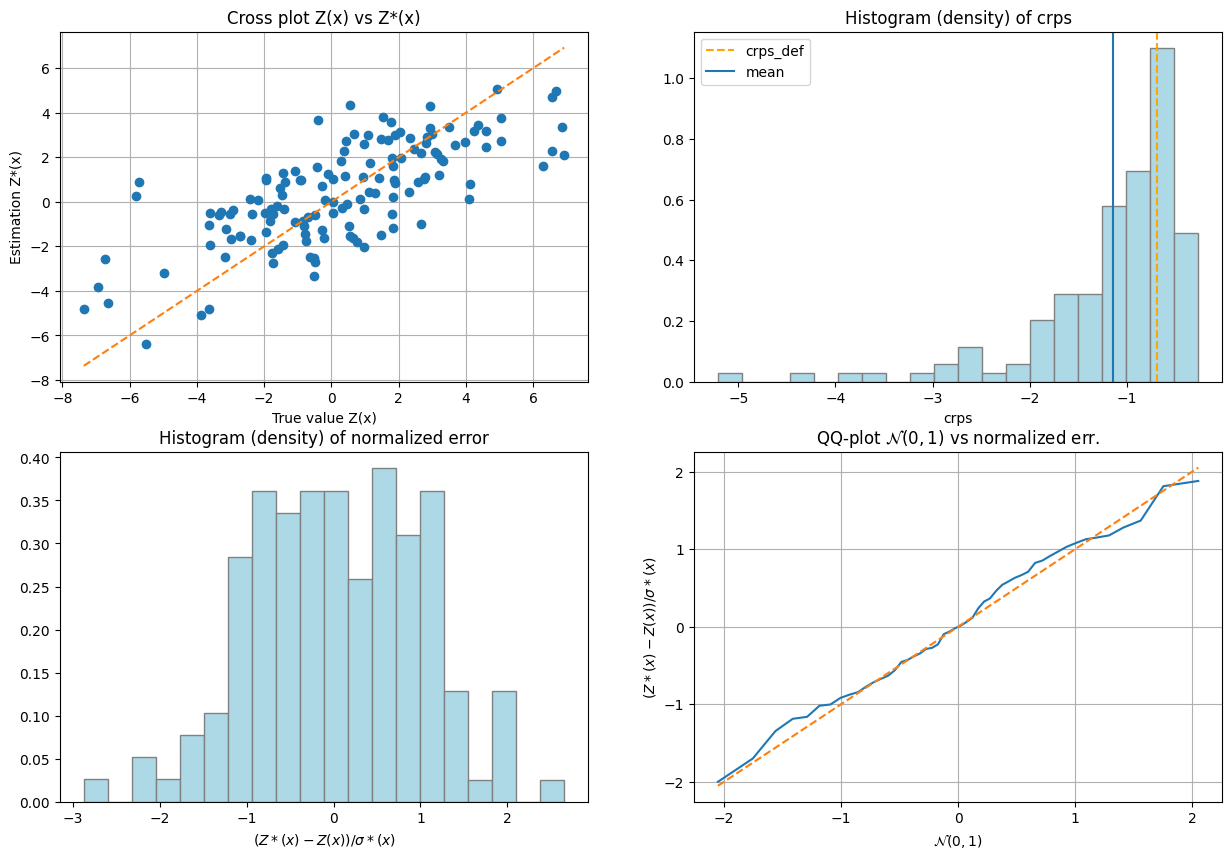
If one test failed (or if the covariance model does not display the desired shape), the covariance model should be rejected and the search for a convenient covariance model be pursued.
[16]:
%%script false --no-raise-error # skip this cell! (comment this line to run the cell)

# Model fitting (skip if not needed)
cov_model_to_optimize = gn.covModel.CovModel2D(
    elem=[('gaussian',    {'w':np.nan, 'r':[np.nan, np.nan]}), # elementary contribution
          ('spherical',   {'w':np.nan, 'r':[np.nan, np.nan]}), # elementary contribution
          ('exponential', {'w':np.nan, 'r':[np.nan, np.nan]}), # elementary contribution
          ('nugget',      {'w':np.nan})                        # elementary contribution
         ], alpha=np.nan, name='')

# New optim. while limiting the distance between pair of points to 150 (hmax=150)
hmax = 150
cov_model_opt, popt = gn.covModel.covModel2D_fit(x, v, cov_model_to_optimize, hmax=hmax,
               bounds=([ 0,   0,   0,  0,   0,   0,  0,   0,   0,   .1,   -90],  # min value for param. to fit
                       [20, 200, 200, 20, 200, 200, 20, 200, 200,    2,    90]), # max value for param. to fit
                      # gaus. contr., sph. contr. , exp. contr. , nug., alpha
               make_plot=False)

# Experimental variograms
alpha_opt = popt[-1] # last component of popt
(hexp1, gexp1, cexp1), (hexp2, gexp2, cexp2) = gn.covModel.variogramExp2D(x, v, alpha=alpha_opt, hmax=(hmax, hmax),
                                                                          ncla=(20,20), make_plot=False)

# Figure: optimal vario and exp. vario along main axes given by alpha_opt
plt.subplots(1,2,figsize=(15,5))
plt.subplot(1,2,1)
gn.covModel.plot_variogramExp1D(hexp1, gexp1, cexp1, c='red', label='vario exp')
cov_model_opt.plot_model_one_curve(vario=True, main_axis=1, hmax=hmax, c='red', label='vario opt')
plt.legend()
plt.title("along x'")

plt.subplot(1,2,2)
gn.covModel.plot_variogramExp1D(hexp2, gexp2, cexp2, c='green', label='vario exp')
cov_model_opt.plot_model_one_curve(vario=True, main_axis=2, hmax=hmax, c='green', label='vario opt')
plt.legend()
plt.title("along y'")

plt.suptitle('alpha_opt={}'.format(alpha_opt))
plt.show()

# Cross-validation
# Interpolation by ordinary kriging (adapt also parameters (interpolator_kwargs) if needed)
cv_est1, cv_std1, pvalue1, success1 = gn.covModel.cross_valid_loo(
                                        x, v, cov_model_opt,
                                        interpolator=gn.covModel.krige,
                                        interpolator_kwargs={'method':'ordinary_kriging'},
                                        print_result=True, make_plot=True, figsize=(15,10), nbins=20)
plt.show()
Note: the following illustrations are similar to what is done in the jupyter notebook ex_vario_analysis_data2D_1_omnidirectional.
Data interpolation by (simple or ordinary) kriging: function geone.covModel.krige
See notebook ex_vario_analysis_data1D_1.ipynb.
[17]:
# Define points xu where to interpolate
# ... location of the 2D-grid used to build the data set (but it could be different)
xcu = ox + (np.arange(nx)+0.5)*sx # x-coordinates of points
ycu = oy + (np.arange(ny)+0.5)*sy # y-coordinates of points
xxcu, yycu = np.meshgrid(xcu, ycu)
xu = np.array((xxcu.reshape(-1), yycu.reshape(-1))).T # 2-dimensional array of shape nx*ny x 2

# Ordinary kriging
t1 = time.time() # start time
vu, vu_std = gn.covModel.krige(x, v, xu, cov_model_opt, method='ordinary_kriging', use_unique_neighborhood=True)
# vu:     1-dimensional array, kriging estimates at location xu
# vu_std: 1-dimensional array, kriging standard deviation at location xu
t1 = time.time() # start time
t2 = time.time() # end time
print(f'Elapsed time: {t2-t1:.4g} sec')

# Fill image (Img class from geone.img) for view
#   variable 0: kriging estimates
#   variable 1: kriging standard deviation
im_krig = gn.img.Img(nx, ny, 1, sx, sy, 1., ox, oy, 0., nv=2, val=np.array((vu, vu_std)))

# Plot
plt.subplots(1,2, figsize=(10,5), sharey=True)

plt.subplot(1,2,1)
gn.imgplot.drawImage2D(im_krig, iv=0, cmap='terrain', title='Ordinary kriging estimates')
plt.plot(x[:,0], x[:,1], 'r+', markersize=15)

plt.subplot(1,2,2)
gn.imgplot.drawImage2D(im_krig, iv=1, cmap='viridis', title='Ordinary kriging standard deviation')
plt.plot(x[:,0], x[:,1], 'r+', markersize=15)

plt.show()
Elapsed time: 1.788e-05 sec
[18]:
# Define points xu where to interpolate
# ... location of the 2D-grid used to build the data set (but it could be different)
xcu = ox + (np.arange(nx)+0.5)*sx # x-coordinates of points
ycu = oy + (np.arange(ny)+0.5)*sy # y-coordinates of points
xxcu, yycu = np.meshgrid(xcu, ycu)
xu = np.array((xxcu.reshape(-1), yycu.reshape(-1))).T # 2-dimensional array of shape nx*ny x 2

# Simple kriging
t1 = time.time() # start time
vu, vu_std = gn.covModel.krige(x, v, xu, cov_model_opt, method='simple_kriging', use_unique_neighborhood=True)
# vu:     1-dimensional array, kriging estimates at location xu
# vu_std: 1-dimensional array, kriging standard deviation at location xu
t2 = time.time() # end time
print(f'Elapsed time: {t2-t1:.4g} sec')

# Fill image (Img class from geone.img) for view
#   variable 0: kriging estimates
#   variable 1: kriging standard deviation
im_krig = gn.img.Img(nx, ny, 1, sx, sy, 1., ox, oy, 0., nv=2, val=np.array((vu, vu_std)))

# Plot
plt.subplots(1,2, figsize=(10,5), sharey=True)

plt.subplot(1,2,1)
gn.imgplot.drawImage2D(im_krig, iv=0, cmap='terrain', title='Simple kriging estimates')
plt.plot(x[:,0], x[:,1], 'r+', markersize=15)

plt.subplot(1,2,2)
gn.imgplot.drawImage2D(im_krig, iv=1, cmap='viridis', title='Simple kriging standard deviation')
plt.plot(x[:,0], x[:,1], 'r+', markersize=15)

plt.show()
Elapsed time: 3.057 sec

Simulation based on simple or ordinary kriging: function geone.covModel.sgs
See notebook ex_vario_analysis_data1D_1.ipynb.
[19]:
# Define points xu where to simulate
# take less points for simulation
sim_nx, sim_ny = 100, 102 # less points
sim_sx, sim_sy = 2*sx, 2*sy # coarser resolution
sim_ox, sim_oy = 25., 40.
sim_xcu = sim_ox + (np.arange(sim_nx)+0.5)*sim_sx # x-coordinates of points
sim_ycu = sim_oy + (np.arange(sim_ny)+0.5)*sim_sy # y-coordinates of points
sim_xxcu, sim_yycu = np.meshgrid(sim_xcu, sim_ycu)
sim_xu = np.array((sim_xxcu.reshape(-1), sim_yycu.reshape(-1))).T # 2-dimensional array of with two columns

# SGS based on ordinary kriging
nreal = 1
np.random.seed(321)
t1 = time.time() # start time
sim_vu = gn.covModel.sgs(x, v, sim_xu, cov_model_opt, method='ordinary_kriging', nreal=nreal)
# sim_vu:   2-dimensional array of shape (nreal, sim_xu.shape[0]), each row is a realization
#           (simulated values at locations sim_xu)
t2 = time.time() # end time
print(f'{nreal} simul. - elapsed time: {t2-t1:.4g} sec')

# Fill image (Img class from geone.img) for view
im_sim = gn.img.Img(sim_nx, sim_ny, 1, sim_sx, sim_sy, 1., sim_ox, sim_oy, 0., nv=nreal, val=sim_vu)

# Plot
plt.subplots(1,2, figsize=(12,5))

plt.subplot(1,2,1)
gn.imgplot.drawImage2D(im_sim, iv=0, cmap='terrain', title='SGS (based on OK), real #0')
#plt.plot(x[:,0], x[:,1], 'r+', markersize=15)

plt.subplot(1,2,2)
gn.imgplot.drawImage2D(im_sim, iv=0, cmap='terrain', title='... with conditioning data points')
plt.plot(x[:,0], x[:,1], 'r+', markersize=15)

plt.show()
1 simul. - elapsed time: 6.043 sec
Kriging estimation and simulation in a grid
The function above (gn.covModel.krige and gn.covModel.sgs[_mp]) should not be used for kriging and SGS in a regular grid. Use the dedicated functions (much faster):
geone.geosclassicinterface.estimate: estimation (kriging) in a gridgeone.geosclassicinterface.simulate: simulation (SGS) in a gridgeone.grf.krige<d>D: estimation (kriging) in a<d>-dimensional gridgeone.grf.grf<d>D: simulation (SGS) in a<d>-dimensional grid
Note: the functions of the module ``geone.grf`` are based on “Fast Fourier Transform” and allow for simple kriging only, and do not handle error on data or inequality data.
Note: the function ``geone.multiGaussian.multiGaussianRun`` can be used as a wrapper to run the functions above.
See notebook ex_vario_analysis_data1D_1.ipynb.
Examples
Estimation using the function geone.covModel.krige
[20]:
t1 = time.time()
vu, vu_std = gn.covModel.krige(x, v, xu, cov_model_opt, method='simple_kriging', use_unique_neighborhood=True)
t2 = time.time()
print('Elapsed time: {:.2g} sec'.format(t2-t1))
Elapsed time: 2.9 sec
Estimation using the function geone.grf.krige2D
Via the function geone.multiGaussian.multiGaussianRun, with keyword arguments mode='estimation', algo='fft'.
[21]:
t1 = time.time()
im_grf = gn.multiGaussian.multiGaussianRun(
                cov_model_opt, (nx, ny), (sx, sy), (ox, oy),
                x=x, v=v,
                mode='estimation', algo='fft', output_mode='img')
# # Or:
# vu_grf, vu_std_grf = gn.grf.krige2D(
#                 cov_model_opt, (nx, ny), (sx, sy), (ox, oy),
#                 x=x, v=v)
# im_grf = gn.img.Img(nx, ny, 1, sx, sy, 1., ox, oy, 0., nv=2, val=np.array((vu_grf, vu_std_grf)))
t2 = time.time()
print('Elapsed time: {:.2g} sec'.format(t2-t1))
krige2D: compute circulant embedding...
krige2D: embedding dimension: 1024 x 1024
krige2D: compute FFT of circulant matrix...
krige2D: compute covariance matrix (rAA) for conditioning locations...
krige2D: compute covariance matrix (rBA) for non-conditioning / conditioning locations...
krige2D: compute rBA * rAA^(-1)...
krige2D: compute kriging estimates...
krige2D: compute kriging standard deviation ...
Elapsed time: 1.1 sec
Estimation using the function geone.geosclassicinterface.estimate
Via the function geone.multiGaussian.multiGaussianRun, with keyword arguments mode='estimation', algo='classic'.
[22]:
t1 = time.time()
im_gci = gn.multiGaussian.multiGaussianRun(
                cov_model_opt, (nx, ny), (sx, sy), (ox, oy),
                x=x, v=v,
                mode='estimation', algo='classic', output_mode='img',
                method='simple_kriging', nneighborMax=24,
                nthreads=8)
# # Or:
# estim_gci = gn.geosclassicinterface.estimate(
#                 cov_model_opt, (nx, ny), (sx, sy), (ox, oy),
#                 x=x, v=v,
#                 method='simple_kriging', nneighborMax=24)
# im_gci = estim_gci['image']
t2 = time.time()
print('Elapsed time: {:.2g} sec'.format(t2-t1))
estimate: pre-process data done: final number of data points : 140, inequality data points: 0
estimate: computational resources: nthreads = 8, nproc_sgs_at_ineq = 8
estimate: (Step 1) no inequality data
estimate: (Step 2) set new dataset gathering data and inequality data locations...
estimate: (Step 3) do kriging at the center of grid cells containing at least one data point...
estimate: (Step 4) do kriging on the grid (at cell centers) using data points at cell centers...
estimate: call `run_MPDSOMPGeosClassicSim` [1 process of 8 thread(s) (OpenMP)] ...
estimate: `run_MPDSOMPGeosClassicSim` [1 process] complete
Elapsed time: 5.9 sec
Plot results of estimation
[23]:
# Fill images (Img class from geone.img) for view
#   variable 0: kriging estimates
#   variable 1: kriging standard deviation
im_krig = gn.img.Img(nx, ny, 1, sx, sy, 1., ox, oy, 0., nv=2, val=np.array((vu, vu_std)))

# Plot
plt.subplots(2,3, figsize=(16,10), sharex=True, sharey=True)

plt.subplot(2,3,1)
gn.imgplot.drawImage2D(im_krig, iv=0, cmap='terrain', title="Krig. est. 'gn.covModel.krige'")
plt.plot(x[:,0], x[:,1], 'r+', markersize=15)

plt.subplot(2,3,2)
gn.imgplot.drawImage2D(im_grf, iv=0, cmap='terrain', title="Krig. est. 'gn.grf.krige2D'")
plt.plot(x[:,0], x[:,1], 'r+', markersize=15)

plt.subplot(2,3,3)
gn.imgplot.drawImage2D(im_gci, iv=0, cmap='terrain', title="Krig. est. 'gn.geosclassicinterface.estimate'")
plt.plot(x[:,0], x[:,1], 'r+', markersize=15)

plt.subplot(2,3,4)
gn.imgplot.drawImage2D(im_krig, iv=1, cmap='viridis', title="Krig. std 'gn.covModel.krige'")
plt.plot(x[:,0], x[:,1], 'r+', markersize=15)

plt.subplot(2,3,5)
gn.imgplot.drawImage2D(im_grf, iv=1, cmap='viridis', title="Krig. std 'gn.grf.krige2D'")
plt.plot(x[:,0], x[:,1], 'r+', markersize=15)

plt.subplot(2,3,6)
gn.imgplot.drawImage2D(im_gci, iv=1, cmap='viridis', title="Krig. std 'gn.geosclassicinterface.estimate'")
plt.plot(x[:,0], x[:,1], 'r+', markersize=15)

plt.show()
[24]:
print("Peak-to-peak estimation 'gn.covModel.krige - gn.grf.krige2D'                   = {}".format(np.ptp(im_krig.val[0] - im_grf.val[0])))
print("Peak-to-peak estimation 'gn.covModel.krige - gn.geosclassicinterface.estimate' = {}".format(np.ptp(im_krig.val[0] - im_gci.val[0])))
print("Peak-to-peak estimation 'gn.grf.krige2D    - gn.geosclassicinterface.estimate' = {}".format(np.ptp(im_grf.val[0] - im_gci.val[0])))
print("Peak-to-peak st. dev.   'gn.covModel.krige - gn.grf.krige2D'                   = {}".format(np.ptp(im_krig.val[1] - im_grf.val[1])))
print("Peak-to-peak st. dev.   'gn.covModel.krige - gn.geosclassicinterface.estimate' = {}".format(np.ptp(im_krig.val[1] - im_gci.val[1])))
print("Peak-to-peak st. dev.   'gn.grf.krige2D    - gn.geosclassicinterface.estimate' = {}".format(np.ptp(im_grf.val[1] - im_gci.val[1])))
Peak-to-peak estimation 'gn.covModel.krige - gn.grf.krige2D'                   = 1.213516754342829
Peak-to-peak estimation 'gn.covModel.krige - gn.geosclassicinterface.estimate' = 1.9527881436740837
Peak-to-peak estimation 'gn.grf.krige2D    - gn.geosclassicinterface.estimate' = 0.963416968580959
Peak-to-peak st. dev.   'gn.covModel.krige - gn.grf.krige2D'                   = 0.4922542633368314
Peak-to-peak st. dev.   'gn.covModel.krige - gn.geosclassicinterface.estimate' = 0.4860656994189041
Peak-to-peak st. dev.   'gn.grf.krige2D    - gn.geosclassicinterface.estimate' = 0.28687261421494925
Conditional simulation using the function geone.grf.grf2D
Via the function geone.multiGaussian.multiGaussianRun, with keyword arguments mode='simulation', algo='fft'.
[25]:
np.random.seed(293)

t1 = time.time()
nreal = 20
im_sim_grf = gn.multiGaussian.multiGaussianRun(
                    cov_model_opt, (nx, ny), (sx, sy), (ox, oy),
                    x=x, v=v,
                    mode='simulation', algo='fft', output_mode='img',
                    nreal=nreal)
# # Or:
# sim_grf = gn.grf.grf2D(
#                     cov_model_opt, (nx, ny), (sx, sy), (ox, oy),
#                     x=x, v=v,
#                     nreal=nreal)
# im_sim_grf = gn.img.Img(nx, ny, 1, sx, sy, 1., ox, oy, 0., nv=nreal, val=sim_grf)
t2 = time.time()
print('Elapsed time: {:.2g} sec'.format(t2-t1))
grf2D: do preliminary computation...
grf2D: compute circulant embedding...
grf2D: embedding dimension: 1024 x 1024
grf2D: compute FFT of circulant matrix...
grf2D: treatment of conditioning data...
grf2D: compute covariance matrix (rAA) for conditioning locations...
grf2D: compute index in the embedding grid for non-conditioning / conditioning locations...
Elapsed time: 3.3 sec
Conditional simulation using the function geone.geosclassicinterface.simulate
Via the function geone.multiGaussian.multiGaussianRun, with keyword arguments mode='simulation', algo='classic', and specifying the computational resources (nproc and nthreads_per_proc).
[26]:
np.random.seed(293)

t1 = time.time()
nreal = 20
im_sim_gci = gn.multiGaussian.multiGaussianRun(
                    cov_model_opt, (nx, ny), (sx, sy), (ox, oy),
                    x=x, v=v,
                    mode='simulation', algo='classic', output_mode='img',
                    method='simple_kriging',
                    nreal=nreal,
                    nproc=2, nthreads_per_proc=4)
# # Or:
# sim_gci = gn.geosclassicinterface.simulate(
#                   cov_model_opt, (nx, ny), (sx, sy), (ox, oy),
#                     x=x, v=v,
#                     method='simple_kriging',
#                     nreal=nreal,
#                     nproc=2, nthreads_per_proc=4)
# im_sim_gci = sim_gci['image']
t2 = time.time()
print('Elapsed time: {:.2g} sec'.format(t2-t1))
simulate: pre-process data done: final number of data points : 140, inequality data points: 0
simulate: computational resources: nproc = 2, nthreads_per_proc = 4, nproc_sgs_at_ineq = 8
simulate: (Step 1) no inequality data
simulate: (Step 2) set new dataset gathering data and inequality data locations...
simulate: (Step 3) do kriging at the center of grid cells containing at least one data point...
simulate: (Step 4) do sgs (20 realizations) on the grid (at cell centers) using data points at cell centers...
simulate: call `run_MPDSOMPGeosClassicSim` [2 process(es) of 4 thread(s) (OpenMP)] ...
simulate: `run_MPDSOMPGeosClassicSim` [2 process(es)] complete
Elapsed time: 4.3 sec
Plot some realizations and compare to the reference simulation
[27]:
# min and max over all real and ref. sim
im_vmin = min(np.min(im_sim_grf.vmin()), np.min(im_sim_gci.vmin()), im_ref.vmin()[0])
im_vmax = max(np.max(im_sim_grf.vmax()), np.min(im_sim_gci.vmax()), im_ref.vmax()[0])

# Plot
plt.subplots(2,3, figsize=(16,10), sharex=True, sharey=True)

plt.subplot(2,3,1)
gn.imgplot.drawImage2D(im_ref, cmap='terrain', vmin=im_vmin, vmax=im_vmax, title='ref. sim')
plt.plot(x[:,0], x[:,1], 'r+', markersize=15)

plt.subplot(2,3,2)
gn.imgplot.drawImage2D(im_sim_grf, iv=0, cmap='terrain', title="Real. #0 'gn.grf.grf2D'")
plt.plot(x[:,0], x[:,1], 'r+', markersize=15)

plt.subplot(2,3,3)
gn.imgplot.drawImage2D(im_sim_gci, iv=0, cmap='terrain', title="Real. #0 'gn.geosclassicinterface.simulate'")
plt.plot(x[:,0], x[:,1], 'r+', markersize=15)

plt.subplot(2,3,4)
plt.axis('off')

plt.subplot(2,3,5)
gn.imgplot.drawImage2D(im_sim_grf, iv=1, cmap='terrain', title="Real. #1 'gn.grf.grf2D'")
#plt.plot(x[:,0], x[:,1], 'r+', markersize=15)

plt.subplot(2,3,6)
gn.imgplot.drawImage2D(im_sim_gci, iv=1, cmap='terrain', title="Real. #1 'gn.geosclassicinterface.simulate'")
#plt.plot(x[:,0], x[:,1], 'r+', markersize=15)

plt.show()
The retained optimal covariance model has an angle alpha close to that of the reference model (which was considered unknown!). The ratio of ranges along the main axes is greater for the retained model than for the reference one, while the nugget is smaller. These differences are visible on the realizations above.