GEONE - DEESSE - Custom search neighborhood
Main points addressed
setting custom search ellipsoid
Import what is required
[1]:
import numpy as np
import matplotlib.pyplot as plt
import time
import os

# import package 'geone'
import geone as gn
[2]:
# Show version of python and version of geone
import sys
print(sys.version_info)
print('geone version: ' + gn.__version__)
sys.version_info(major=3, minor=13, micro=7, releaselevel='final', serial=0)
geone version: 1.3.0
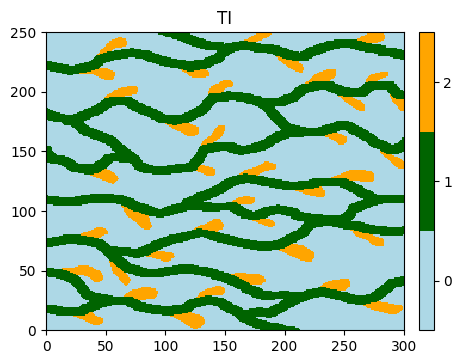
Training image (TI)
[3]:
# Read file
data_dir = 'data'
filename = os.path.join(data_dir, 'ti.txt')
ti = gn.img.readImageTxt(filename)

# Values in the TI
ti.get_unique()
[3]:
array([0., 1., 2.])
[4]:
# Setting for categories / colors
categ_val = [0, 1, 2]
categ_col = ['lightblue', 'darkgreen', 'orange']

plt.figure(figsize=(5,5))
gn.imgplot.drawImage2D(ti, categ=True, categVal=categ_val, categCol=categ_col, title='TI')
plt.show()
Custom search ellipsoid
Class geone.deesseinterface.SearchNeighborhoodParameters
To simulate a cell in the simulation grid, the pattern made up of (at most) the nneighboringNode informed cells the closest to the simulated cell is retrieved. Only the cells within a search ellipsoid centered at the simulated cell are considered. The search ellipsoid is defined by
rx,ry,rz: radii in each direction, in number of cells,ax,ay,az: anisotropy ratios (or inverse units): the distance to the central node is the Euclidean distance with cell unit:1/axby1/ayby1/azangle1,angle2,angle3: azimuth, dip, and plunge angles in degrees (default:0,0,0) to re-orient the search ellipsoidpower: a power (default:0) at which the distance to the central cell is raised, to get the weight of the pattern cells
Several modes are available to set the radii (radiusMode), in particular:
large_default(default): large radii automatically computed according to the size of the simulation grid and the TImanual: the parametersrx,ry,rzare required (set manually)
Several modes are available to set the anisotropy ratios (anisotropyRatioMode), in particular:
one(default): anisotropy ratios automatically set toax=ay=az=1.0radius: anisotropy ratios automatically set to the corresponding radius,ax=rx,ay=ry,az=rz, so that the distance on the border of the search ellipsoid is equal to onemanual:ax,ay,azare required (set manually)
Notes:
It can be useful to limit the size of the search ellipsoid (by setting the radii) in presence of a small hard data set, in order to avoid realizations with too poor variability.
It can be useful to set the anisotropy ratios manually to preferentially search in some direction(s) when retrieving the pattern for simulating a cell.
Examples using different search neigbhorhood ellipsoids
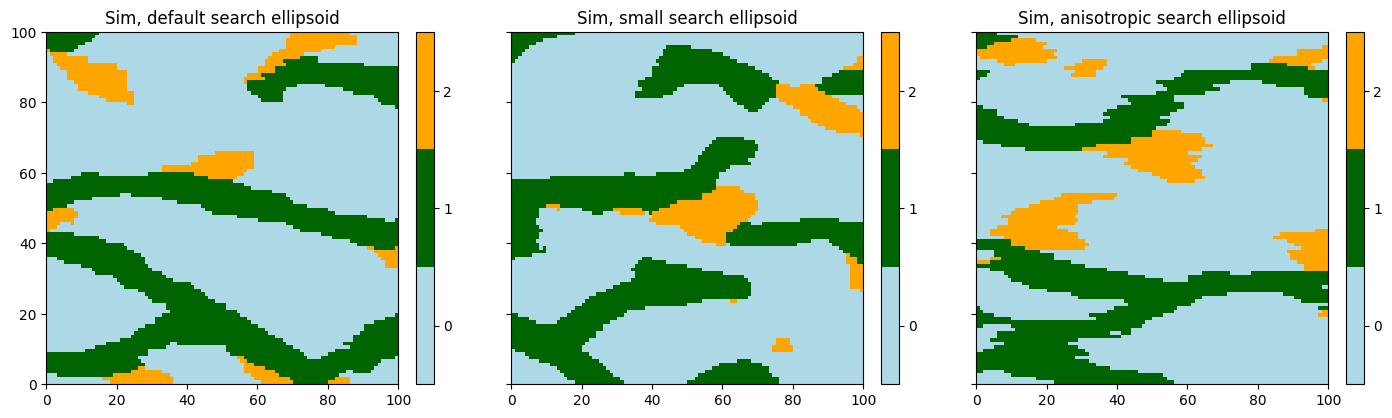
Simulation with default search ellipsoid
[5]:
# Default search ellipsoid
deesse_input1 = gn.deesseinterface.DeesseInput(
    nx=100, ny=100, nz=1,
    nv=1, varname='code',
    TI=ti,
    distanceType='categorical',
    nneighboringNode=24,
    distanceThreshold=0.02,
    maxScanFraction=0.25,
    npostProcessingPathMax=1,
    seed=444,
    nrealization=1)

# Run deesse
t1 = time.time() # start time
deesse_output1 = gn.deesseinterface.deesseRun(deesse_input1)
t2 = time.time() # end time
print(f'Elapsed time: {t2-t1:.2g} sec')
deesseRun: DeeSse running... [VERSION 3.2 / BUILD NUMBER 20230914 / OpenMP 19 thread(s)]
deesseRun: DeeSse run complete
Elapsed time: 0.29 sec
Simulation with small search ellipsoid by setting the radii manually
[6]:
# Search ellipsoid with small radii
snp = gn.deesseinterface.SearchNeighborhoodParameters(
    radiusMode='manual', rx=10, ry=10, rz=0
)

deesse_input2 = gn.deesseinterface.DeesseInput(
    nx=100, ny=100, nz=1,
    nv=1, varname='code',
    TI=ti,
    distanceType='categorical',
    searchNeighborhoodParameters = snp, # set search neighborhood parameters (ellipsoid)
    nneighboringNode=24,
    distanceThreshold=0.02,
    maxScanFraction=0.25,
    npostProcessingPathMax=1,
    seed=444,
    nrealization=1)

# Run deesse
t1 = time.time() # start time
deesse_output2 = gn.deesseinterface.deesseRun(deesse_input2, verbose=2)
t2 = time.time() # end time
print(f'Elapsed time: {t2-t1:.2g} sec')
deesseRun: DeeSse running... [VERSION 3.2 / BUILD NUMBER 20230914 / OpenMP 19 thread(s)]
deesseRun: DeeSse run complete
Elapsed time: 0.16 sec
Simulation with anisotropic search ellipsoid (preferential search in one direction)
[7]:
# Anisotropic search ellipsoid with preferential search in x-direction
snp = gn.deesseinterface.SearchNeighborhoodParameters(
    anisotropyRatioMode='manual', ax=20, ay=1, az=1
)

deesse_input3 = gn.deesseinterface.DeesseInput(
    nx=100, ny=100, nz=1,
    nv=1, varname='code',
    TI=ti,
    distanceType='categorical',
    searchNeighborhoodParameters = snp, # set search neighborhood parameters (ellipsoid)
    nneighboringNode=24,
    distanceThreshold=0.02,
    maxScanFraction=0.25,
    npostProcessingPathMax=1,
    seed=444,
    nrealization=1)

# Run deesse
t1 = time.time() # start time
deesse_output3 = gn.deesseinterface.deesseRun(deesse_input3)
t2 = time.time() # end time
print(f'Elapsed time: {t2-t1:.2g} sec')
deesseRun: DeeSse running... [VERSION 3.2 / BUILD NUMBER 20230914 / OpenMP 19 thread(s)]
deesseRun: DeeSse run complete
Elapsed time: 0.24 sec
Results and display
[8]:
# Retrieve the realizations
sim1 = deesse_output1['sim']
sim2 = deesse_output2['sim']
sim3 = deesse_output3['sim']

# Display
plt.subplots(1, 3, figsize=(17,5), sharey=True) # 1 x 3 sub-plots

plt.subplot(1, 3, 1)
gn.imgplot.drawImage2D(sim1[0], categ=True, categVal=categ_val, categCol=categ_col,
                       title='Sim, default search ellipsoid')

plt.subplot(1, 3, 2)
gn.imgplot.drawImage2D(sim2[0], categ=True, categVal=categ_val, categCol=categ_col,
                       title='Sim, small search ellipsoid')

plt.subplot(1, 3, 3)
gn.imgplot.drawImage2D(sim3[0], categ=True, categVal=categ_val, categCol=categ_col,
                       title='Sim, anisotropic search ellipsoid')

plt.show()