GEONE - DEESSE - Simulations with rotation in 3D
Main points addressed
deesse simulation with rotation in 3D, meaning of angles (azimuth, dip and plunge)
Defining rotation in 3D
The user should give the rotation that is applied to the TI to obtain the desired orientation of the structure. A rotation in 3D is defined by three elementary rotations, given by three angles:  (azimuth),
  (dip), and
  (plunge):
 .
. .
. .
.
The TI being given in the system  , the system
  correspond to the new orientation (desired for the simulation). Note that rotation can be applied globally or locally, with or without tolerance (see example in the jupyter notebook
 ex_deesse_05_geom_transformation).
Import what is required
[1]:
import numpy as np
import matplotlib.pyplot as plt
import pyvista as pv
import time
import os

# import package 'geone'
import geone as gn
[2]:
# Show version of python and version of geone
import sys
print(sys.version_info)
print('geone version: ' + gn.__version__)
sys.version_info(major=3, minor=13, micro=7, releaselevel='final', serial=0)
geone version: 1.3.0
[3]:
pv.set_jupyter_backend('static') # to get static plots within the jupyter notebook
The training image used for illustrations
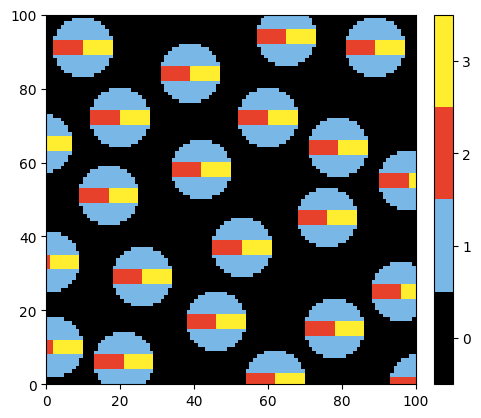
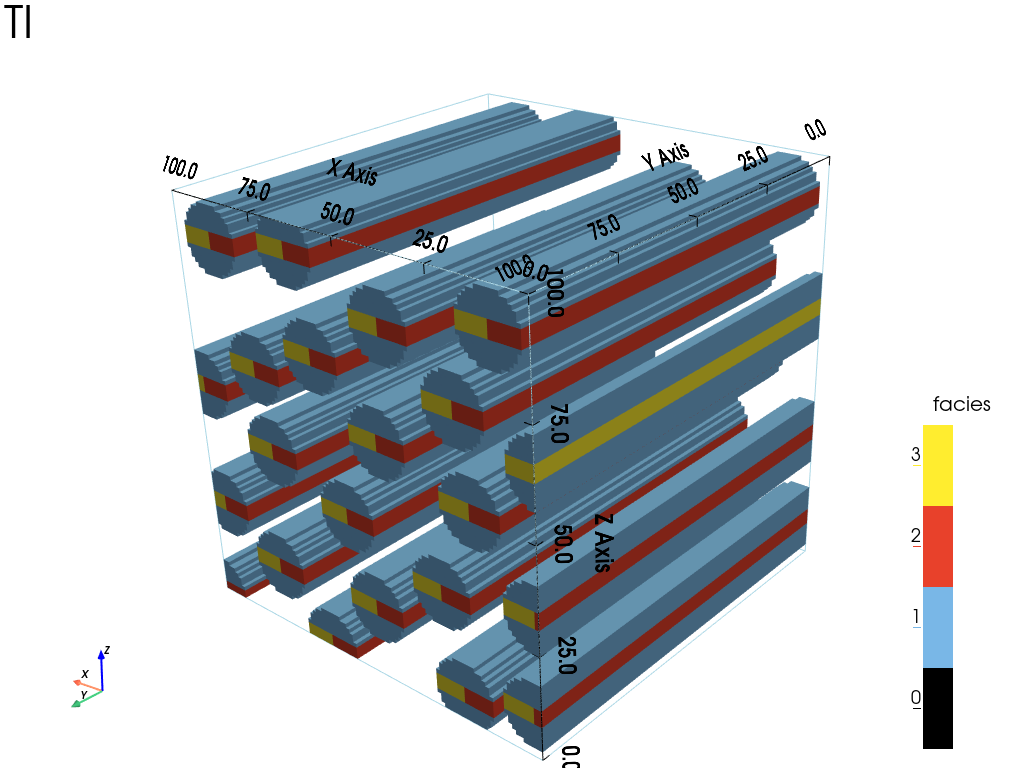
The training image consists of circular pipes (cylinders) along the  -axis with an horizontal stripe in the middle. It is built from a section given in a png image.
[4]:
# Read the section from png
data_dir = 'data' # directory containing the png file
ti2d, col = gn.img.readImage2Drgb(os.path.join(data_dir, 'ti_tubes_section.png'), categ=True)

gn.imgplot.drawImage2D(ti2d, categ=True, categCol=col)
plt.show()
[5]:
# Build the 3D TI (extruding)
ny = 100 # length of pipe in number of pixels
ti = gn.img.Img(ti2d.nx, ny, ti2d.ny, nv=1,
                val=np.array([np.tile(x, ny).reshape(ny,-1) for x in ti2d.val.reshape(ti2d.ny, ti2d.nx)]),
                varname='facies')

# Get facies
facies = ti.get_unique()
facies
[5]:
array([0., 1., 2., 3.])
[6]:
# Colors for facies
facies_col = col # get from colors above

# Facies to be shown
facies_to_show = [False, True, True, True] # display facies[i] iff facies_to_show[i] is True
[7]:
# Viewing the TI in 3D
#    - set mode in "categorical variable" (categ=True), and
#        - specify list of category values (categVal)
#        - specify color for each category value (categCol)
#        - specify which categories are "active" for display (categActive)
#    - set title for the scalar bar

# Plot "interactive in pop-up window" or "inline" (comment the undesired one) ...
# ... interactive (after closing the pop-up window, the position of the camera is retrieved in output)
#pp = pv.Plotter(notebook=False)
# ... inline
pp = pv.Plotter()
gn.imgplot3d.drawImage3D_surface(
    ti,
    plotter=pp,
    categ=True,
    categVal=facies,
    categCol=facies_col,
    categActive=facies_to_show,
    alpha=1.0,
    show_bounds=True,   # add bounds (axis with graduation)
    scalar_bar_kwargs={'title':'facies','title_font_size':20, 'vertical':True},
    text='TI'
)
cpos = [(-150, 270, 190), (50.0, 50.0, 50.0), (0.25, -0.33, 0.90)] # camera position
pp.show(cpos=cpos) # position of the camera can be specified
Building images of local angles used further
Simulation grid is the same one as the TI grid.
[8]:
nx, ny, nz = ti.nx, ti.ny, ti.nz
sx, sy, sz = ti.sx, ti.sy, ti.sz
ox, oy, oz = ti.ox, ti.oy, ti.oz
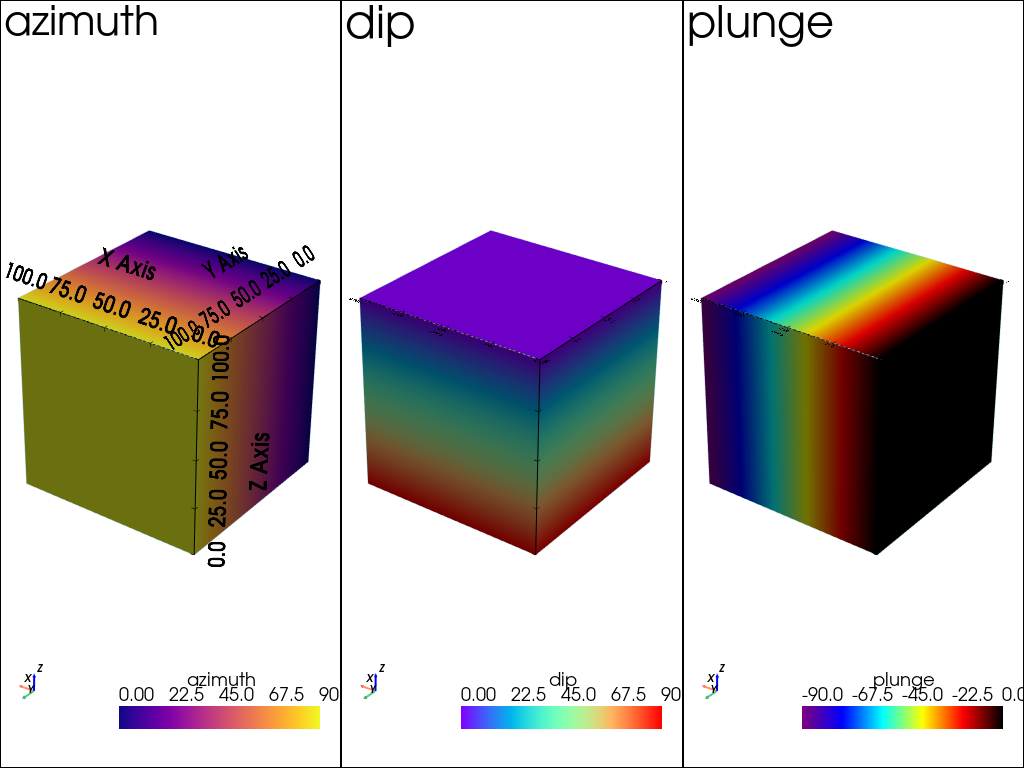
Angle images
azimuth_img: values varying linearly from to
to  along -axis
dip_img: values varying linearly from to along  -axis
-axisplunge_img: values varying linearly from to  along
along  -axis
-axis
[9]:
vy = np.linspace(0, 90, ny) # values along y-axis
vz = np.linspace(90, 0, nz) # values along z-axis
vx = np.linspace(0, -90, nx) # values along x-axis

val_azimuth = np.tile(np.repeat(vy, nx), nz)
val_dip     = np.repeat(vz, nx*ny)
val_plunge  = np.tile(vx, ny*nz)

img_azimuth = gn.img.Img(nx, ny, nz, sx, sy, sz, ox, oy, oz, nv=1, val=val_azimuth, varname='azimuth')
img_dip     = gn.img.Img(nx, ny, nz, sx, sy, sz, ox, oy, oz, nv=1, val=val_dip,     varname='dip')
img_plunge  = gn.img.Img(nx, ny, nz, sx, sy, sz, ox, oy, oz, nv=1, val=val_plunge,  varname='plunge')
[10]:
# Set color map for angles
cmap_azimuth = 'plasma'
cmap_dip     = 'rainbow'
cmap_plunge  = gn.customcolors.cmap2
[11]:
# Plot angle images

# Plot "interactive in pop-up window" or "inline" (comment the undesired one) ...
# ... interactive (after closing the pop-up window, the position of the camera is retrieved in output)
#pp = pv.Plotter(shape=(1,3), notebook=False)
# ... inline
pp = pv.Plotter(shape=(1,3))

# ... plot
pp.subplot(0, 0)
gn.imgplot3d.drawImage3D_surface(img_azimuth,
                                 plotter=pp, cmap=cmap_azimuth,
                                 show_bounds=True,   # add bounds (axis with graduation)
                                 text=img_azimuth.varname[0])

pp.subplot(0, 1)
gn.imgplot3d.drawImage3D_surface(img_dip,
                                 plotter=pp, cmap=cmap_dip,
                                 show_bounds=True,   # add bounds (axis with graduation)
                                 text=img_dip.varname[0])

pp.subplot(0, 2)
gn.imgplot3d.drawImage3D_surface(img_plunge,
                                 plotter=pp, cmap=cmap_plunge,
                                 show_bounds=True,   # add bounds (axis with graduation)
                                 text=img_plunge.varname[0])

pp.link_views()
cpos = [(-300, 540, 380), (50.0, 50.0, 50.0), (0.25, -0.33, 0.90)] # camera position
pp.show(cpos=cpos)
Main simulation parameters for the following
Note that, working with local rotation, it can be helpful to limit the size of the search ellipsoid, in order to find similar patterns in the training image during the simulation.
[12]:
nneighboringNode = 32
distanceThreshold = 0.07
maxScanFraction = 0.01

# Search ellipsoid with limited radii
snp = gn.deesseinterface.SearchNeighborhoodParameters(radiusMode='manual', rx=20, ry=20, rz=20)
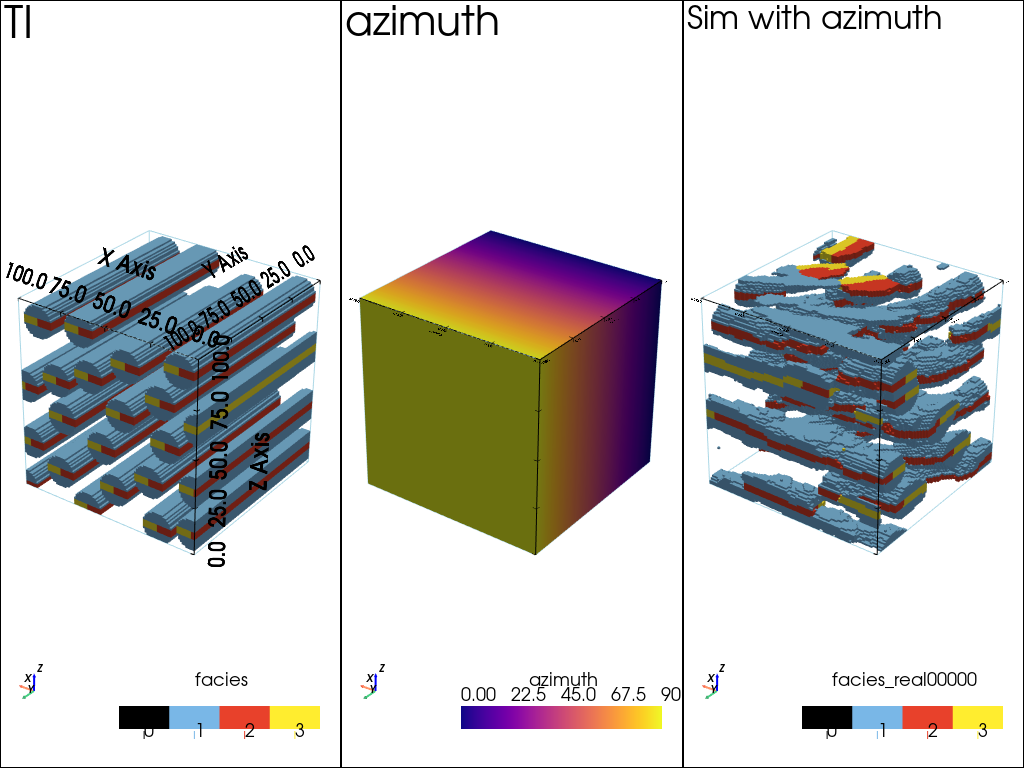
Simulation setting (local) azimuth only
[13]:
# Set deesse input and launch simulation (one real)
nreal = 1
deesse_input = gn.deesseinterface.DeesseInput(
    nx=nx, ny=ny, nz=nz,
    sx=sx, sy=sy, sz=sz,
    ox=ox, oy=oy, oz=oz,
    nv=1, varname='facies',
    TI=ti,
    rotationUsage=1,             # use rotation without tolerance
    rotationAzimuthLocal=True,   #    rotation according to azimuth: local
    rotationAzimuth=val_azimuth, #    rotation azimuth: map of values
    distanceType='categorical',
    searchNeighborhoodParameters=snp, # set search neigbhorhood parameters
    nneighboringNode=nneighboringNode,
    distanceThreshold=distanceThreshold,
    maxScanFraction=maxScanFraction,
    npostProcessingPathMax=1,
    seed=444,
    nrealization=nreal)

# Run deesse
t1 = time.time() # start time
deesse_output = gn.deesseinterface.deesseRun(deesse_input, nthreads=8)
t2 = time.time() # end time
print(f'Elapsed time: {t2-t1:.2g} sec')

# Retrieve the result
sim_azimuth = deesse_output['sim'][0]
deesseRun: DeeSse running... [VERSION 3.2 / BUILD NUMBER 20230914 / OpenMP 8 thread(s)]
deesseRun: DeeSse run complete
Elapsed time: 13 sec
[14]:
# Plot "interactive in pop-up window" or "inline" (comment the undesired one) ...
# ... interactive (after closing the pop-up window, the position of the camera is retrieved in output)
#pp = pv.Plotter(shape=(1,3), notebook=False)
# ... inline
pp = pv.Plotter(shape=(1,3))

pp.subplot(0, 0)
gn.imgplot3d.drawImage3D_surface(ti,
                                 plotter=pp,
                                 categ=True,
                                 categVal=facies,
                                 categCol=facies_col,
                                 categActive=facies_to_show,
                                 alpha=1.0,
                                 show_bounds=True,   # add bounds (axis with graduation)
                                 text='TI')

pp.subplot(0, 1)
gn.imgplot3d.drawImage3D_surface(img_azimuth,
                                 plotter=pp, cmap=cmap_azimuth,
                                 show_bounds=True,   # add bounds (axis with graduation)
                                 text=img_azimuth.varname[0])

pp.subplot(0, 2)
gn.imgplot3d.drawImage3D_surface(sim_azimuth,
                                 plotter=pp,
                                 categ=True,
                                 categVal=facies,
                                 categCol=facies_col,
                                 categActive=facies_to_show,
                                 alpha=1.0,
                                 show_bounds=True,   # add bounds (axis with graduation)
                                 text='Sim with azimuth')

pp.link_views()
cpos = [(-300, 540, 380), (50.0, 50.0, 50.0), (0.25, -0.33, 0.90)] # camera position
pp.show(cpos=cpos)
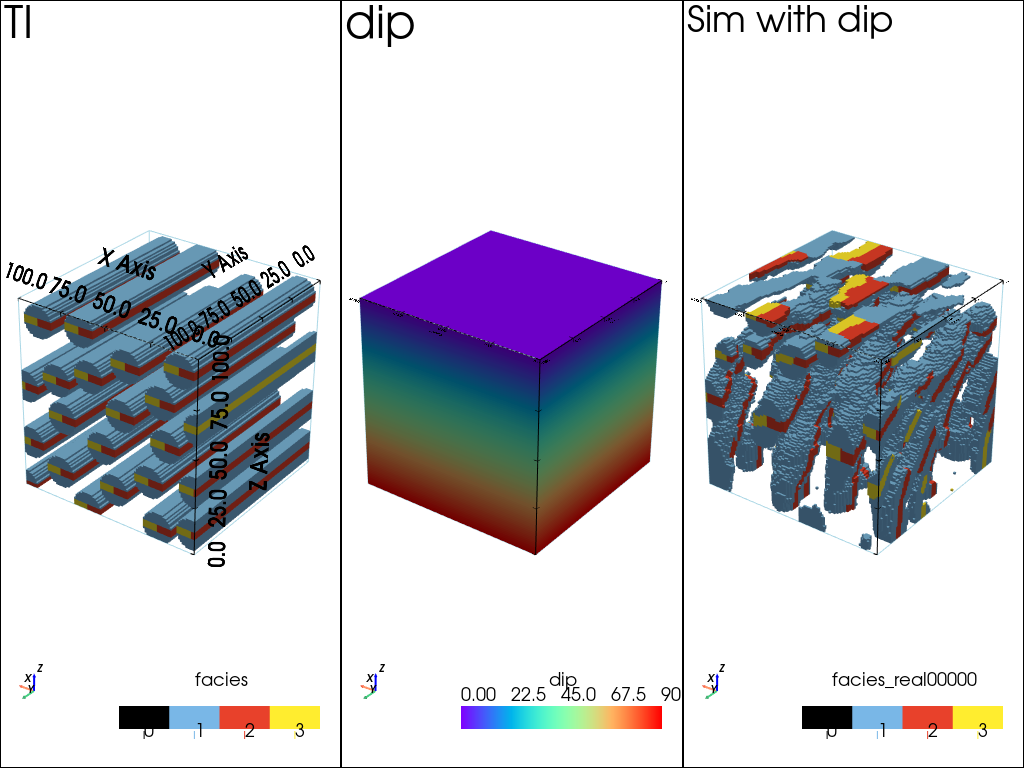
Simulation setting (local) dip only
[15]:
# Set deesse input and launch simulation (one real)
nreal = 1
deesse_input = gn.deesseinterface.DeesseInput(
    nx=nx, ny=ny, nz=nz,
    sx=sx, sy=sy, sz=sz,
    ox=ox, oy=oy, oz=oz,
    nv=1, varname='facies',
    TI=ti,
    rotationUsage=1,             # use rotation without tolerance
    rotationDipLocal=True,       #    rotation according to dip: local
    rotationDip=val_dip,         #    rotation dip: map of values
    distanceType='categorical',
    searchNeighborhoodParameters=snp, # set search neigbhorhood parameters
    nneighboringNode=nneighboringNode,
    distanceThreshold=distanceThreshold,
    maxScanFraction=maxScanFraction,
    npostProcessingPathMax=1,
    seed=444,
    nrealization=nreal)

# Run deesse
t1 = time.time() # start time
deesse_output = gn.deesseinterface.deesseRun(deesse_input, nthreads=8)
t2 = time.time() # end time
print(f'Elapsed time: {t2-t1:.2g} sec')

# Retrieve the result
sim_dip = deesse_output['sim'][0]
deesseRun: DeeSse running... [VERSION 3.2 / BUILD NUMBER 20230914 / OpenMP 8 thread(s)]
deesseRun: DeeSse run complete
Elapsed time: 17 sec
[16]:
# Plot "interactive in pop-up window" or "inline" (comment the undesired one) ...
# ... interactive (after closing the pop-up window, the position of the camera is retrieved in output)
#pp = pv.Plotter(shape=(1,3), notebook=False)
# ... inline
pp = pv.Plotter(shape=(1,3))

pp.subplot(0, 0)
gn.imgplot3d.drawImage3D_surface(ti,
                                 plotter=pp,
                                 categ=True,
                                 categVal=facies,
                                 categCol=facies_col,
                                 categActive=facies_to_show,
                                 alpha=1.0,
                                 show_bounds=True,   # add bounds (axis with graduation)
                                 text='TI')

pp.subplot(0, 1)
gn.imgplot3d.drawImage3D_surface(img_dip,
                                 plotter=pp, cmap=cmap_dip,
                                 show_bounds=True,   # add bounds (axis with graduation)
                                 text=img_dip.varname[0])

pp.subplot(0, 2)
gn.imgplot3d.drawImage3D_surface(sim_dip,
                                 plotter=pp,
                                 categ=True,
                                 categVal=facies,
                                 categCol=facies_col,
                                 categActive=facies_to_show,
                                 alpha=1.0,
                                 show_bounds=True,   # add bounds (axis with graduation)
                                 text='Sim with dip')

pp.link_views()
cpos = [(-300, 540, 380), (50.0, 50.0, 50.0), (0.25, -0.33, 0.90)] # camera position
pp.show(cpos=cpos)
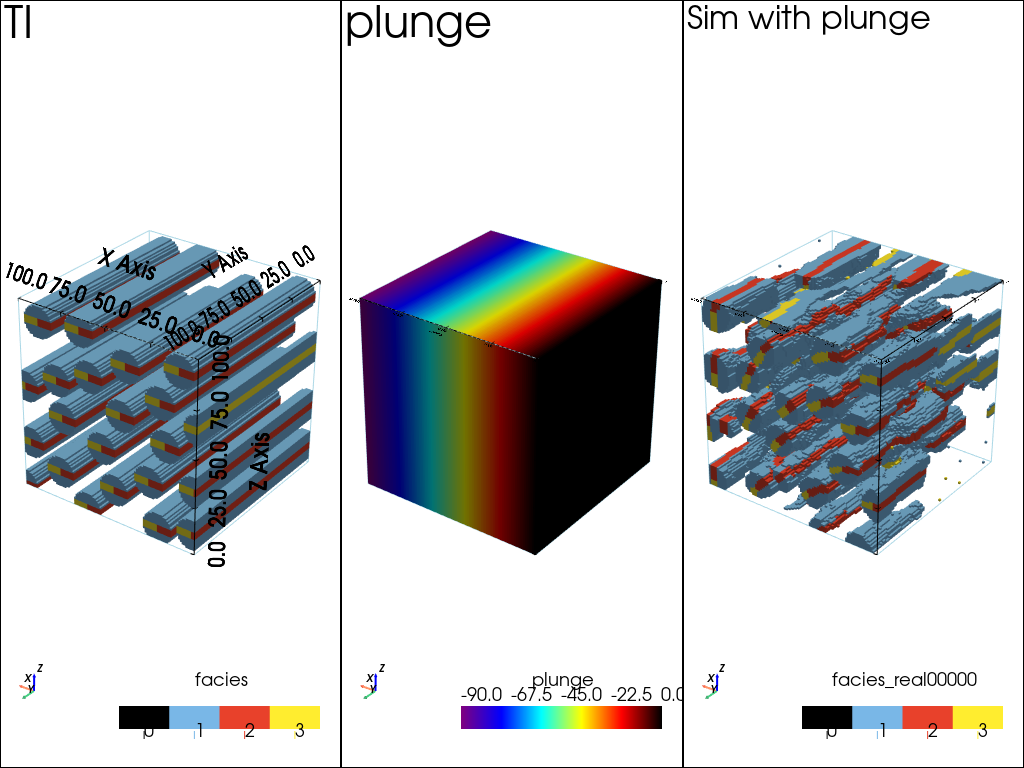
Simulation setting (local) plunge only
[17]:
# Set deesse input and launch simulation (one real)
nreal = 1
deesse_input = gn.deesseinterface.DeesseInput(
    nx=nx, ny=ny, nz=nz,
    sx=sx, sy=sy, sz=sz,
    ox=ox, oy=oy, oz=oz,
    nv=1, varname='facies',
    TI=ti,
    rotationUsage=1,             # use rotation without tolerance
    rotationPlungeLocal=True,    #    rotation according to plunge: local
    rotationPlunge=val_plunge,   #    rotation plunge: map of values
    distanceType='categorical',
    searchNeighborhoodParameters=snp, # set search neigbhorhood parameters
    nneighboringNode=nneighboringNode,
    distanceThreshold=distanceThreshold,
    maxScanFraction=maxScanFraction,
    npostProcessingPathMax=1,
    seed=444,
    nrealization=nreal)

# Run deesse
t1 = time.time() # start time
deesse_output = gn.deesseinterface.deesseRun(deesse_input, nthreads=8)
t2 = time.time() # end time
print(f'Elapsed time: {t2-t1:.2g} sec')

# Retrieve the result
sim_plunge = deesse_output['sim'][0]
deesseRun: DeeSse running... [VERSION 3.2 / BUILD NUMBER 20230914 / OpenMP 8 thread(s)]
deesseRun: DeeSse run complete
Elapsed time: 18 sec
[18]:
# Plot "interactive in pop-up window" or "inline" (comment the undesired one) ...
# ... interactive (after closing the pop-up window, the position of the camera is retrieved in output)
#pp = pv.Plotter(shape=(1,3), notebook=False)
# ... inline
pp = pv.Plotter(shape=(1,3))

pp.subplot(0, 0)
gn.imgplot3d.drawImage3D_surface(ti,
                                 plotter=pp,
                                 categ=True,
                                 categVal=facies,
                                 categCol=facies_col,
                                 categActive=facies_to_show,
                                 alpha=1.0,
                                 show_bounds=True,   # add bounds (axis with graduation)
                                 text='TI')

pp.subplot(0, 1)
gn.imgplot3d.drawImage3D_surface(img_plunge,
                                 plotter=pp, cmap=cmap_plunge,
                                 show_bounds=True,   # add bounds (axis with graduation)
                                 text=img_plunge.varname[0])

pp.subplot(0, 2)
gn.imgplot3d.drawImage3D_surface(sim_plunge,
                                 plotter=pp,
                                 categ=True,
                                 categVal=facies,
                                 categCol=facies_col,
                                 categActive=facies_to_show,
                                 alpha=1.0,
                                 show_bounds=True,   # add bounds (axis with graduation)
                                 text='Sim with plunge')

pp.link_views()
cpos = [(-300, 540, 380), (50.0, 50.0, 50.0), (0.25, -0.33, 0.90)] # camera position
pp.show(cpos=cpos)
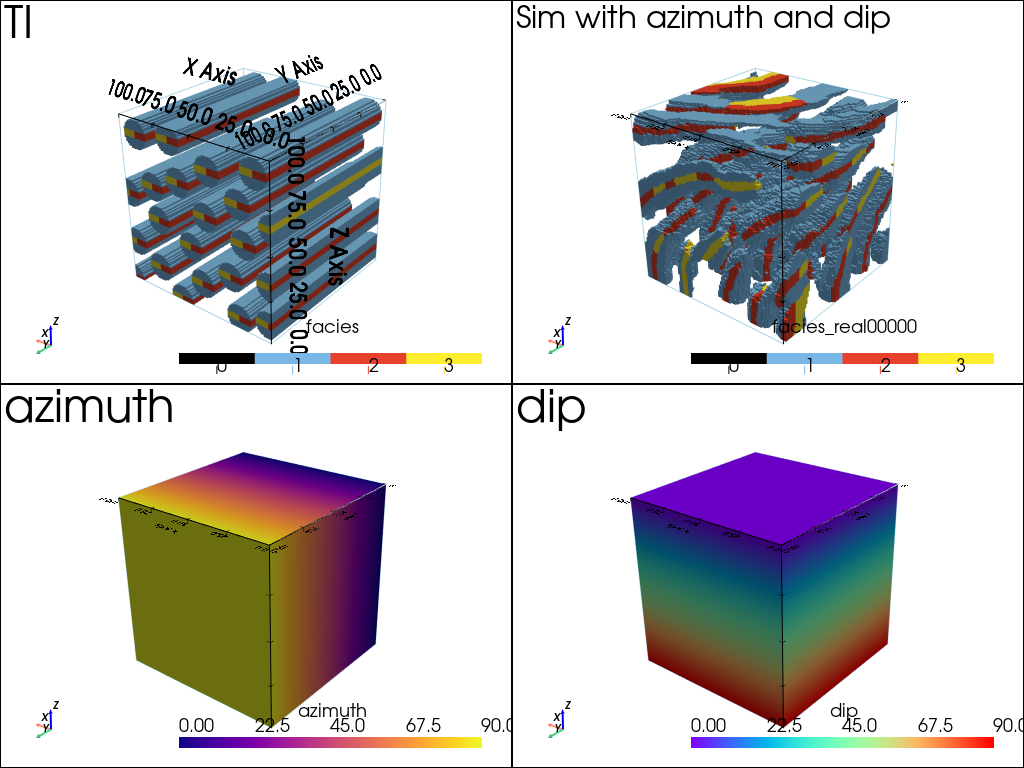
Simulation setting (local) azimuth and dip
[19]:
# Set deesse input and launch simulation (one real)
nreal = 1
deesse_input = gn.deesseinterface.DeesseInput(
    nx=nx, ny=ny, nz=nz,
    sx=sx, sy=sy, sz=sz,
    ox=ox, oy=oy, oz=oz,
    nv=1, varname='facies',
    TI=ti,
    rotationUsage=1,             # use rotation without tolerance
    rotationAzimuthLocal=True,   #    rotation according to azimuth: local
    rotationAzimuth=val_azimuth, #    rotation azimuth: map of values
    rotationDipLocal=True,       #    rotation according to dip: local
    rotationDip=val_dip,         #    rotation dip: map of values
    distanceType='categorical',
    searchNeighborhoodParameters=snp, # set search neigbhorhood parameters
    nneighboringNode=nneighboringNode,
    distanceThreshold=distanceThreshold,
    maxScanFraction=maxScanFraction,
    npostProcessingPathMax=1,
    seed=444,
    nrealization=nreal)

# Run deesse
t1 = time.time() # start time
deesse_output = gn.deesseinterface.deesseRun(deesse_input, nthreads=8)
t2 = time.time() # end time
print(f'Elapsed time: {t2-t1:.2g} sec')

# Retrieve the result
sim_azimuth_dip = deesse_output['sim'][0]
deesseRun: DeeSse running... [VERSION 3.2 / BUILD NUMBER 20230914 / OpenMP 8 thread(s)]
deesseRun: DeeSse run complete
Elapsed time: 21 sec
[20]:
# Plot "interactive in pop-up window" or "inline" (comment the undesired one) ...
# ... interactive (after closing the pop-up window, the position of the camera is retrieved in output)
#pp = pv.Plotter(shape=(2,2), notebook=False)
# ... inline
pp = pv.Plotter(shape=(2,2))

pp.subplot(0, 0)
gn.imgplot3d.drawImage3D_surface(ti,
                                 plotter=pp,
                                 categ=True,
                                 categVal=facies,
                                 categCol=facies_col,
                                 categActive=facies_to_show,
                                 alpha=1.0,
                                 show_bounds=True,   # add bounds (axis with graduation)
                                 text='TI')

pp.subplot(0, 1)
gn.imgplot3d.drawImage3D_surface(sim_azimuth_dip,
                                 plotter=pp,
                                 categ=True,
                                 categVal=facies,
                                 categCol=facies_col,
                                 categActive=facies_to_show,
                                 alpha=1.0,
                                 show_bounds=True,   # add bounds (axis with graduation)
                                 text='Sim with azimuth and dip')

pp.subplot(1, 0)
gn.imgplot3d.drawImage3D_surface(img_azimuth,
                                 plotter=pp, cmap=cmap_azimuth,
                                 show_bounds=True,   # add bounds (axis with graduation)
                                 text=img_azimuth.varname[0])

pp.subplot(1, 1)
gn.imgplot3d.drawImage3D_surface(img_dip,
                                 plotter=pp, cmap=cmap_dip,
                                 show_bounds=True,   # add bounds (axis with graduation)
                                 text=img_dip.varname[0])

pp.link_views()
cpos = [(-180, 324, 228), (50.0, 50.0, 50.0), (0.25, -0.33, 0.90)] # camera position
pp.show(cpos=cpos)
Simulation setting (local) azimuth and plunge
[21]:
# Set deesse input and launch simulation (one real)
nreal = 1
deesse_input = gn.deesseinterface.DeesseInput(
    nx=nx, ny=ny, nz=nz,
    sx=sx, sy=sy, sz=sz,
    ox=ox, oy=oy, oz=oz,
    nv=1, varname='facies',
    TI=ti,
    rotationUsage=1,             # use rotation without tolerance
    rotationAzimuthLocal=True,   #    rotation according to azimuth: local
    rotationAzimuth=val_azimuth, #    rotation azimuth: map of values
    rotationPlungeLocal=True,    #    rotation according to plunge: local
    rotationPlunge=val_plunge,   #    rotation plunge: map of values
    distanceType='categorical',
    searchNeighborhoodParameters=snp, # set search neigbhorhood parameters
    nneighboringNode=nneighboringNode,
    distanceThreshold=distanceThreshold,
    maxScanFraction=maxScanFraction,
    npostProcessingPathMax=1,
    seed=444,
    nrealization=nreal)

# Run deesse
t1 = time.time() # start time
deesse_output = gn.deesseinterface.deesseRun(deesse_input, nthreads=8)
t2 = time.time() # end time
print(f'Elapsed time: {t2-t1:.2g} sec')

# Retrieve the result
sim_azimuth_plunge = deesse_output['sim'][0]
deesseRun: DeeSse running... [VERSION 3.2 / BUILD NUMBER 20230914 / OpenMP 8 thread(s)]
deesseRun: DeeSse run complete
Elapsed time: 20 sec
[22]:
# Plot "interactive in pop-up window" or "inline" (comment the undesired one) ...
# ... interactive (after closing the pop-up window, the position of the camera is retrieved in output)
#pp = pv.Plotter(shape=(2,2), notebook=False)
# ... inline
pp = pv.Plotter(shape=(2,2))

pp.subplot(0, 0)
gn.imgplot3d.drawImage3D_surface(ti,
                                 plotter=pp,
                                 categ=True,
                                 categVal=facies,
                                 categCol=facies_col,
                                 categActive=facies_to_show,
                                 alpha=1.0,
                                 show_bounds=True,   # add bounds (axis with graduation)
                                 text='TI')

pp.subplot(0, 1)
gn.imgplot3d.drawImage3D_surface(sim_azimuth_plunge,
                                 plotter=pp,
                                 categ=True,
                                 categVal=facies,
                                 categCol=facies_col,
                                 categActive=facies_to_show,
                                 alpha=1.0,
                                 show_bounds=True,   # add bounds (axis with graduation)
                                 text='Sim with azimuth and plunge')

pp.subplot(1, 0)
gn.imgplot3d.drawImage3D_surface(img_azimuth,
                                 plotter=pp, cmap=cmap_azimuth,
                                 show_bounds=True,   # add bounds (axis with graduation)
                                 text=img_azimuth.varname[0])

pp.subplot(1, 1)
gn.imgplot3d.drawImage3D_surface(img_plunge,
                                 plotter=pp, cmap=cmap_plunge,
                                 show_bounds=True,   # add bounds (axis with graduation)
                                 text=img_plunge.varname[0])

pp.link_views()
cpos = [(-180, 324, 228), (50.0, 50.0, 50.0), (0.25, -0.33, 0.90)] # camera position
pp.show(cpos=cpos)
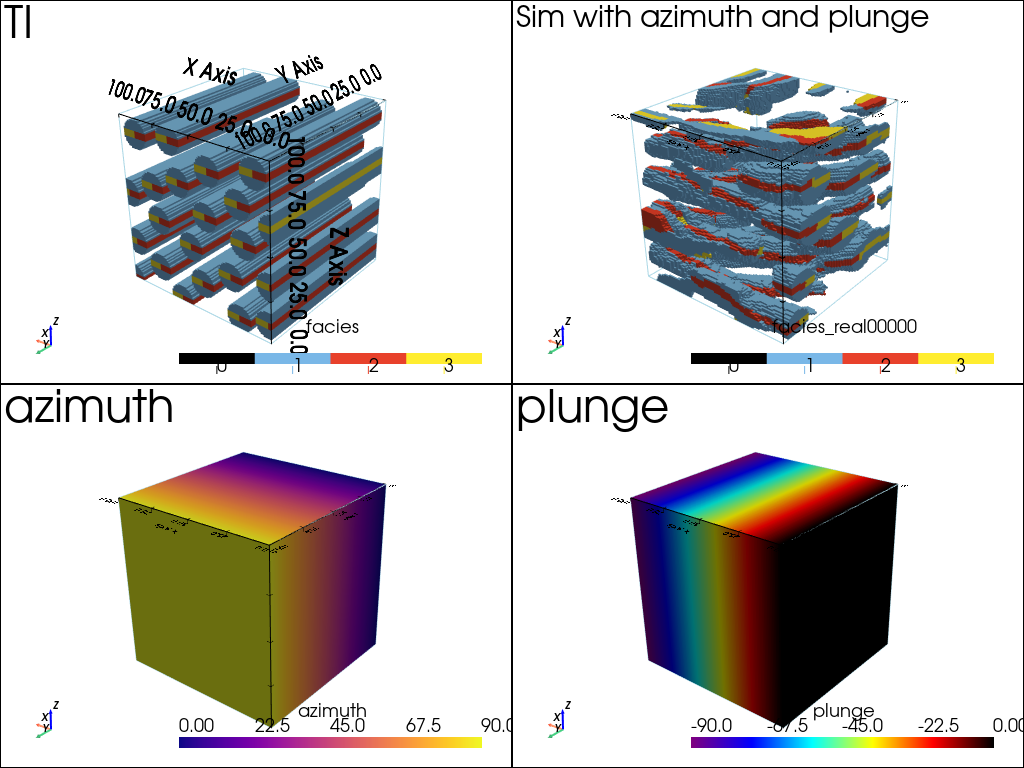
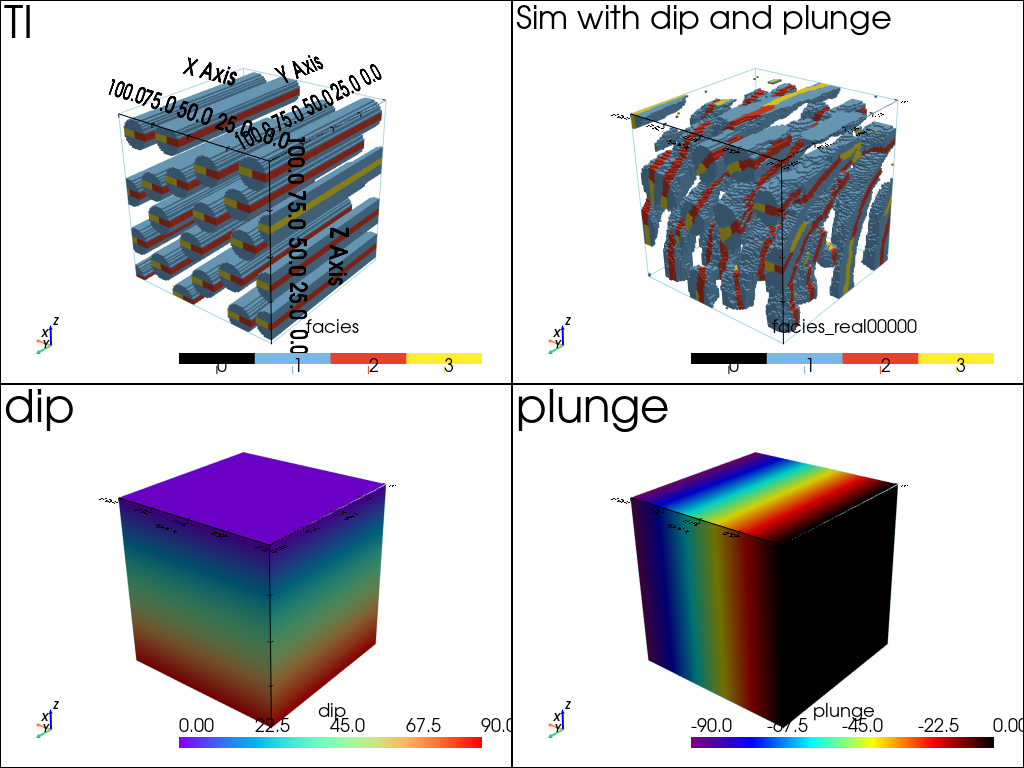
Simulation setting (local) dip and plunge
[23]:
# Set deesse input and launch simulation (one real)
nreal = 1
deesse_input = gn.deesseinterface.DeesseInput(
    nx=nx, ny=ny, nz=nz,
    sx=sx, sy=sy, sz=sz,
    ox=ox, oy=oy, oz=oz,
    nv=1, varname='facies',
    TI=ti,
    rotationUsage=1,             # use rotation without tolerance
    rotationDipLocal=True,       #    rotation according to dip: local
    rotationDip=val_dip,         #    rotation dip: map of values
    rotationPlungeLocal=True,    #    rotation according to plunge: local
    rotationPlunge=val_plunge,   #    rotation plunge: map of values
    distanceType='categorical',
    searchNeighborhoodParameters=snp, # set search neigbhorhood parameters
    nneighboringNode=nneighboringNode,
    distanceThreshold=distanceThreshold,
    maxScanFraction=maxScanFraction,
    npostProcessingPathMax=1,
    seed=444,
    nrealization=nreal)

# Run deesse
t1 = time.time() # start time
deesse_output = gn.deesseinterface.deesseRun(deesse_input, nthreads=8)
t2 = time.time() # end time
print(f'Elapsed time: {t2-t1:.2g} sec')

# Retrieve the result
sim_dip_plunge = deesse_output['sim'][0]
deesseRun: DeeSse running... [VERSION 3.2 / BUILD NUMBER 20230914 / OpenMP 8 thread(s)]
deesseRun: DeeSse run complete
Elapsed time: 21 sec
[24]:
# Plot "interactive in pop-up window" or "inline" (comment the undesired one) ...
# ... interactive (after closing the pop-up window, the position of the camera is retrieved in output)
#pp = pv.Plotter(shape=(2,2), notebook=False)
# ... inline
pp = pv.Plotter(shape=(2,2))

pp.subplot(0, 0)
gn.imgplot3d.drawImage3D_surface(ti,
                                 plotter=pp,
                                 categ=True,
                                 categVal=facies,
                                 categCol=facies_col,
                                 categActive=facies_to_show,
                                 alpha=1.0,
                                 show_bounds=True,   # add bounds (axis with graduation)
                                 text='TI')

pp.subplot(0, 1)
gn.imgplot3d.drawImage3D_surface(sim_dip_plunge,
                                 plotter=pp,
                                 categ=True,
                                 categVal=facies,
                                 categCol=facies_col,
                                 categActive=facies_to_show,
                                 alpha=1.0,
                                 show_bounds=True,   # add bounds (axis with graduation)
                                 text='Sim with dip and plunge')

pp.subplot(1, 0)
gn.imgplot3d.drawImage3D_surface(img_dip,
                                 plotter=pp, cmap=cmap_dip,
                                 show_bounds=True,   # add bounds (axis with graduation)
                                 text=img_dip.varname[0])

pp.subplot(1, 1)
gn.imgplot3d.drawImage3D_surface(img_plunge,
                                 plotter=pp, cmap=cmap_plunge,
                                 show_bounds=True,   # add bounds (axis with graduation)
                                 text=img_plunge.varname[0])

pp.link_views()
cpos = [(-180, 324, 228), (50.0, 50.0, 50.0), (0.25, -0.33, 0.90)] # camera position
pp.show(cpos=cpos)
Simulation setting (local) azimuth, dip and plunge
[25]:
# Set deesse input and launch simulation (one real)
nreal = 1
deesse_input = gn.deesseinterface.DeesseInput(
    nx=nx, ny=ny, nz=nz,
    sx=sx, sy=sy, sz=sz,
    ox=ox, oy=oy, oz=oz,
    nv=1, varname='facies',
    TI=ti,
    rotationUsage=1,             # use rotation without tolerance
    rotationAzimuthLocal=True,   #    rotation according to azimuth: local
    rotationAzimuth=val_azimuth, #    rotation azimuth: map of values
    rotationDipLocal=True,       #    rotation according to dip: local
    rotationDip=val_dip,         #    rotation dip: map of values
    rotationPlungeLocal=True,    #    rotation according to plunge: local
    rotationPlunge=val_plunge,   #    rotation plunge: map of values
    distanceType='categorical',
    searchNeighborhoodParameters=snp, # set search neigbhorhood parameters
    nneighboringNode=nneighboringNode,
    distanceThreshold=distanceThreshold,
    maxScanFraction=maxScanFraction,
    npostProcessingPathMax=1,
    seed=444,
    nrealization=nreal)

# Run deesse
t1 = time.time() # start time
deesse_output = gn.deesseinterface.deesseRun(deesse_input, nthreads=8)
t2 = time.time() # end time
print(f'Elapsed time: {t2-t1:.2g} sec')

# Retrieve the result
sim_azimuth_dip_plunge = deesse_output['sim'][0]
deesseRun: DeeSse running... [VERSION 3.2 / BUILD NUMBER 20230914 / OpenMP 8 thread(s)]
deesseRun: DeeSse run complete
Elapsed time: 21 sec
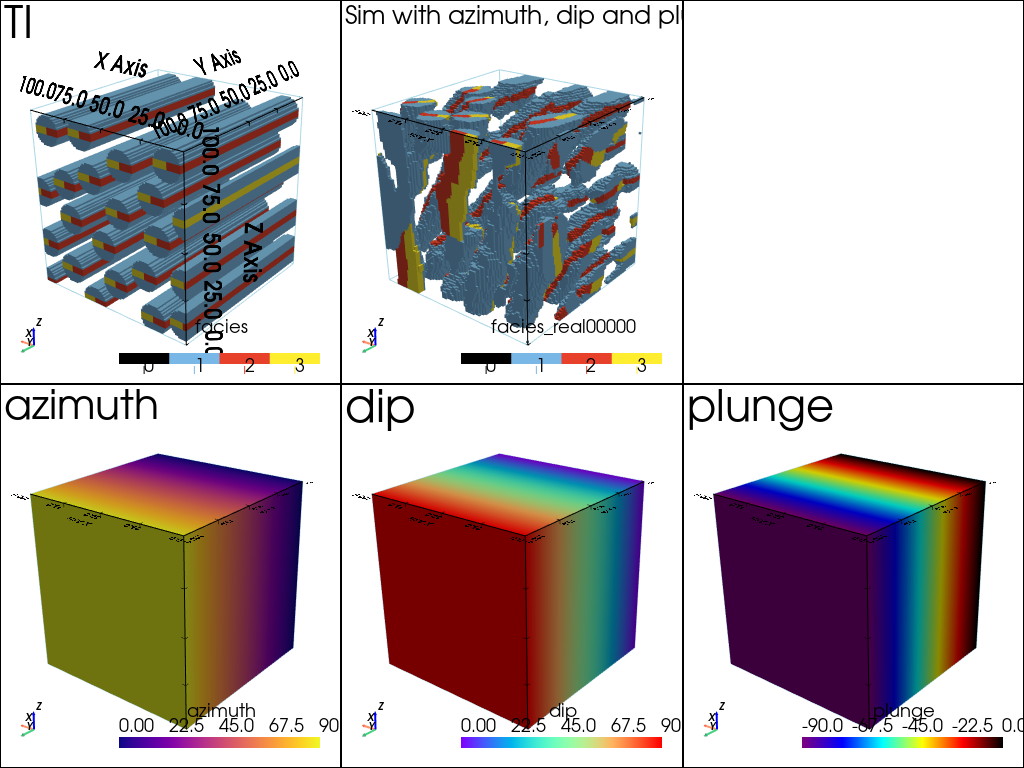
[26]:
# Plot "interactive in pop-up window" or "inline" (comment the undesired one) ...
# ... interactive (after closing the pop-up window, the position of the camera is retrieved in output)
#pp = pv.Plotter(shape=(2,3), notebook=False)
# ... inline
pp = pv.Plotter(shape=(2,3))

pp.subplot(0, 0)
gn.imgplot3d.drawImage3D_surface(ti,
                                 plotter=pp,
                                 categ=True,
                                 categVal=facies,
                                 categCol=facies_col,
                                 categActive=facies_to_show,
                                 alpha=1.0,
                                 show_bounds=True,   # add bounds (axis with graduation)
                                 text='TI')

pp.subplot(0, 1)
gn.imgplot3d.drawImage3D_surface(sim_azimuth_dip_plunge,
                                 plotter=pp,
                                 categ=True,
                                 categVal=facies,
                                 categCol=facies_col,
                                 categActive=facies_to_show,
                                 alpha=1.0,
                                 show_bounds=True,   # add bounds (axis with graduation)
                                 text='Sim with azimuth, dip and plunge')

pp.subplot(1, 0)
gn.imgplot3d.drawImage3D_surface(img_azimuth,
                                 plotter=pp, cmap=cmap_azimuth,
                                 show_bounds=True,   # add bounds (axis with graduation)
                                 text=img_azimuth.varname[0])

pp.subplot(1, 1)
gn.imgplot3d.drawImage3D_surface(img_dip,
                                 plotter=pp, cmap=cmap_dip,
                                 show_bounds=True,   # add bounds (axis with graduation)
                                 text=img_dip.varname[0])

pp.subplot(1, 2)
gn.imgplot3d.drawImage3D_surface(img_plunge,
                                 plotter=pp, cmap=cmap_plunge,
                                 show_bounds=True,   # add bounds (axis with graduation)
                                 text=img_plunge.varname[0])

pp.link_views()
cpos = [(-180, 323, 209), (50.0, 50.0, 50.0), (0.25, -0.33, 0.90)] # camera position
pp.show(cpos=cpos)
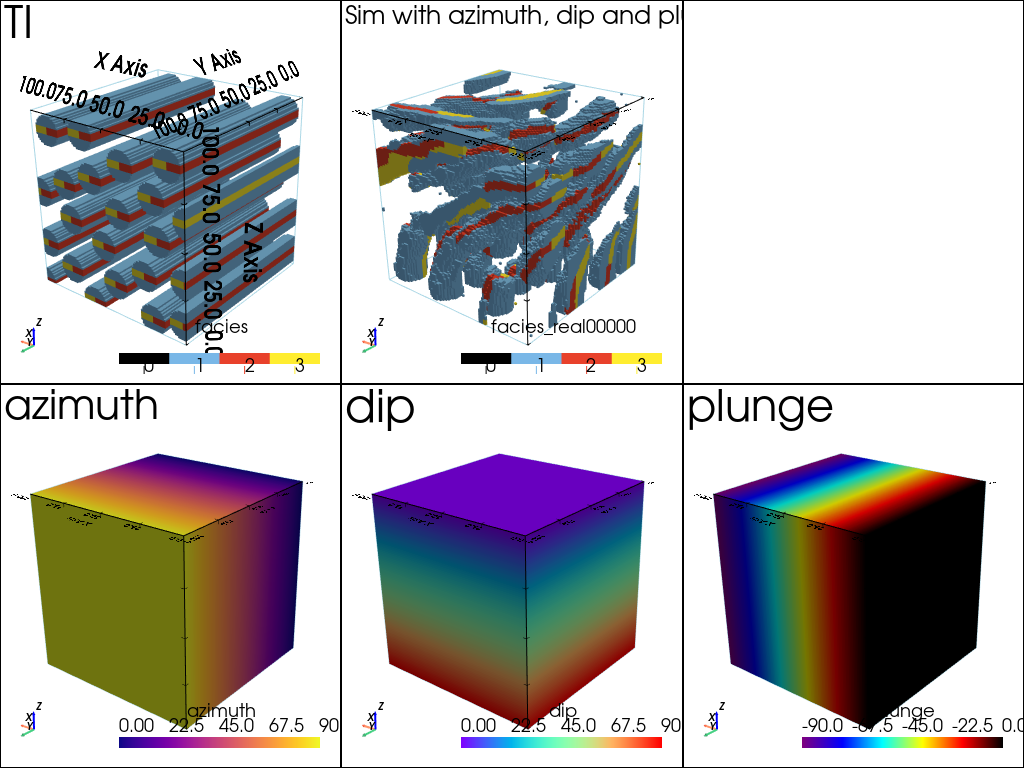
Simulation setting (local) azimuth, dip and plunge (other angle images)
[27]:
v = np.linspace(0, 90, ny)
vv = np.tile(np.repeat(vy, nx), nz)

val2_azimuth = vv
val2_dip     = vv
val2_plunge  = -vv
img2_azimuth = gn.img.Img(nx, ny, nz, sx, sy, sz, ox, oy, oz, nv=1, val=val2_azimuth, varname='azimuth')
img2_dip     = gn.img.Img(nx, ny, nz, sx, sy, sz, ox, oy, oz, nv=1, val=val2_dip,     varname='dip')
img2_plunge  = gn.img.Img(nx, ny, nz, sx, sy, sz, ox, oy, oz, nv=1, val=val2_plunge,  varname='plunge')
[28]:
# Set deesse input and launch simulation (one real)
nreal = 1
deesse_input = gn.deesseinterface.DeesseInput(
    nx=nx, ny=ny, nz=nz,
    sx=sx, sy=sy, sz=sz,
    ox=ox, oy=oy, oz=oz,
    nv=1, varname='facies',
    TI=ti,
    rotationUsage=1,              # use rotation without tolerance
    rotationAzimuthLocal=True,    #    rotation according to azimuth: local
    rotationAzimuth=val2_azimuth, #    rotation azimuth: map of values
    rotationDipLocal=True,        #    rotation according to dip: local
    rotationDip=val2_dip,         #    rotation dip: map of values
    rotationPlungeLocal=True,     #    rotation according to plunge: local
    rotationPlunge=val2_plunge,   #    rotation plunge: map of values
    distanceType='categorical',
    searchNeighborhoodParameters=snp, # set search neigbhorhood parameters
    nneighboringNode=nneighboringNode,
    distanceThreshold=distanceThreshold,
    maxScanFraction=maxScanFraction,
    npostProcessingPathMax=1,
    seed=444,
    nrealization=nreal)

# Run deesse
t1 = time.time() # start time
deesse_output = gn.deesseinterface.deesseRun(deesse_input, nthreads=8)
t2 = time.time() # end time
print(f'Elapsed time: {t2-t1:.2g} sec')

# Retrieve the result
sim2_azimuth_dip_plunge = deesse_output['sim'][0]
deesseRun: DeeSse running... [VERSION 3.2 / BUILD NUMBER 20230914 / OpenMP 8 thread(s)]
deesseRun: DeeSse run complete
Elapsed time: 22 sec
[29]:
# Plot "interactive in pop-up window" or "inline" (comment the undesired one) ...
# ... interactive (after closing the pop-up window, the position of the camera is retrieved in output)
#pp = pv.Plotter(shape=(2,3), notebook=False)
# ... inline
pp = pv.Plotter(shape=(2,3))

pp.subplot(0, 0)
gn.imgplot3d.drawImage3D_surface(ti,
                                 plotter=pp,
                                 categ=True,
                                 categVal=facies,
                                 categCol=facies_col,
                                 categActive=facies_to_show,
                                 alpha=1.0,
                                 show_bounds=True,   # add bounds (axis with graduation)
                                 text='TI')

pp.subplot(0, 1)
gn.imgplot3d.drawImage3D_surface(sim2_azimuth_dip_plunge,
                                 plotter=pp,
                                 categ=True,
                                 categVal=facies,
                                 categCol=facies_col,
                                 categActive=facies_to_show,
                                 alpha=1.0,
                                 show_bounds=True,   # add bounds (axis with graduation)
                                 text='Sim with azimuth, dip and plunge')

pp.subplot(1, 0)
gn.imgplot3d.drawImage3D_surface(img2_azimuth,
                                 plotter=pp, cmap=cmap_azimuth,
                                 show_bounds=True,   # add bounds (axis with graduation)
                                 text=img2_azimuth.varname[0])

pp.subplot(1, 1)
gn.imgplot3d.drawImage3D_surface(img2_dip,
                                 plotter=pp, cmap=cmap_dip,
                                 show_bounds=True,   # add bounds (axis with graduation)
                                 text=img2_dip.varname[0])

pp.subplot(1, 2)
gn.imgplot3d.drawImage3D_surface(img2_plunge,
                                 plotter=pp, cmap=cmap_plunge,
                                 show_bounds=True,   # add bounds (axis with graduation)
                                 text=img2_plunge.varname[0])

pp.link_views()
cpos = [(-180, 323, 209), (50.0, 50.0, 50.0), (0.25, -0.33, 0.90)] # camera position
pp.show(cpos=cpos)